The goal of this writeup is to create an additional layer of defense versus analysis. A lot of malwares utilize this technique in order for the binary analysis make more harder.
Polymorphism is an important concept of object-oriented programming. It simply means more than one form. That is, the same entity (function or operator) behaves differently in different scenarios
www.programiz.com
We can implement polymorphism in C++ using the following ways:
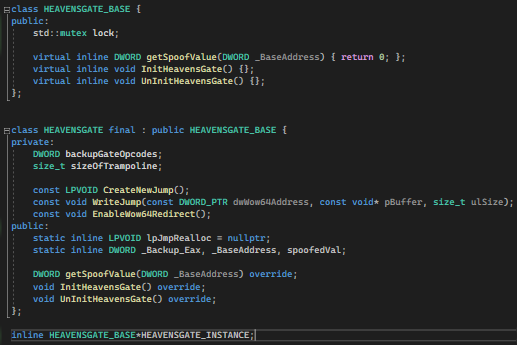
Now, let’s get it working. For this article, we are using a basic class named HEAVENSGATE_BASE and HEAVENSGATE.
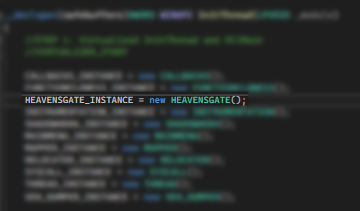
Fig1: Instantiation
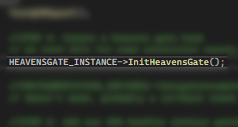
Then we will be calling a function on an Instantiated Object.
Fig2: Call to a function
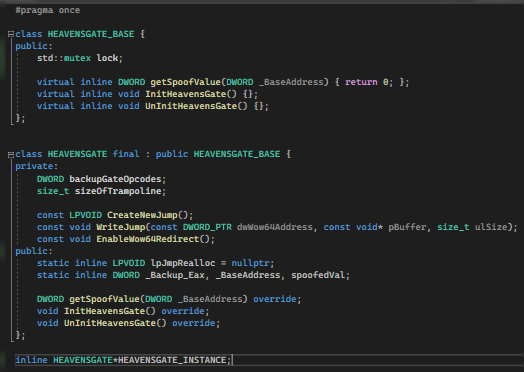
Normal Declarations
Fig3: We have a pointer named HEAVENSGATE_INSTANCE.
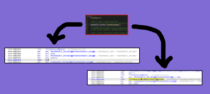
When we examine the function call (Fig2) under IDA, we get the result of:
Fig4: Direct Call to HEAVENSGATE::InitHeavensGate
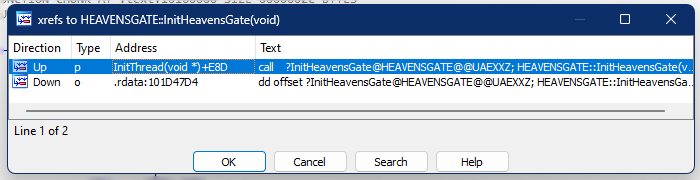
and when we cross-reference the functions, we will see on screen:
Fig5: xref HEAVENSGATE::InitHeavensGate
The xref on the .rdata is a call from VirtualTable of the Instantiated object. And the xref on the InitThread is a call to the function (Fig2).
Basic Obfuscation
So, how do we apply basic obfuscation?
We just need to change the declaration of Object to be the “_BASE” level.
Fig6: A pointer named HEAVENSGATE_INSTANCE pointer to HEAVENSGATE_BASE
Unlike earlier, the pointer points to a class named HEAVENSGATE. But this time we will be using the “_BASE”.
Under the IDA, we can see the following instructions:
Fig7: Obfuscated call
Well, technically, it isn’t obfuscated. But the thing is, when an analyzer doesn’t have the .pdb file which contains the symbols name, then it will be harder to follow the calls and purpose of a certain call without using debugger.
This disassembly shows exactly what is going on under the hood with relation to polymorphism. For the invocations of function, the compiler moves the address of the object in to the EDX register. This is then dereferenced to get the base of the VMT and stored in the EAX register. The appropriate VMT entry for the function is found by using EAX as an index and storing the address in EDX. This function is then called. Since HEAVENSGATE_BASE and HEAVENSGATE have different VMTs, this code will call different functions — the appropriate ones — for the appropriate object type. Seeing how it’s done under the hood also allows us to easily write a function to print the VMT.
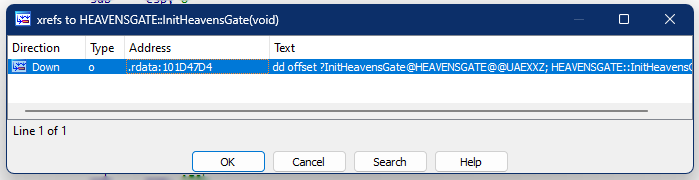
Fig8: Direct function call is now gone
We can now just see that the direct call (in comparison with Fig5) is now gone. Traces and footprints will be harder to be traced.
Conclusion
Dividing the classes into two: a Base and the Original class, is a time consuming task. It also make the code looks ugly. But somehow, it can greatly add protection to our binary from analysis.
This won’t get too long. Just a quick fix for heavens gate hook (http://mark.rxmsolutions.com/through-the-heavens-gate/) as Microsoft updates the wow64cpu.dll that manages the translation from 32bit to 64bit syscalls of WoW64 applications.
To better visualize the change, here is the comparison of before and after.
Prior to 22h2, down until win10.
win11 22h2
With that being said, you cannot place a hook on 0x3010 as it would take a size of 8 bytes replacement. And would destroy the call mechanism even if you fix the displacement of call.
The solution
The solution is pretty simple. As in very very simple. Copy all the bytes from 0x3010 down until 0x302D. Fix the displacement only for the copied jmp at 0x3028. Then place the hook at 0x3010. Basically, the copied gate (via VirtualAlloc or Codecave) will continue execution from original 0x3010. And so, the original 0x3015 and onwards will not be executed ever again.
Pretty easy right?
Notes
In the past, Microsoft tends to use far jump to set the CS:33. CS:33 signify that the execution will be a long 64 bit mode in order to translate from 32bit to 64bit. Now, they managed to create bridge without the need for far jmp. Lot of readings need to be cited in order to understand these new mechanism but please do let me know!
I am now close at finishing the HTB Junior Pentester role course but decided to take a quick brake and focus on one of my favorite fields: reversing games and evading anti-cheat.
The goal
The end goal is simple, to bypass the Cheat Engine for usermode anti-cheats and allow us to debug a game using type-1 hypervisor.
This writeup will be divided into 3 parts.
First will be the concept of Direct Kernel Object Manipulation to make a process unlink from eprocess struct.
Second, the concept of hypervisor for debugging.
And lastly, is the concept of Patchguard, Driver Signature Enforcement and how to disable those.
So without further ado, let’s get our hands dirty!
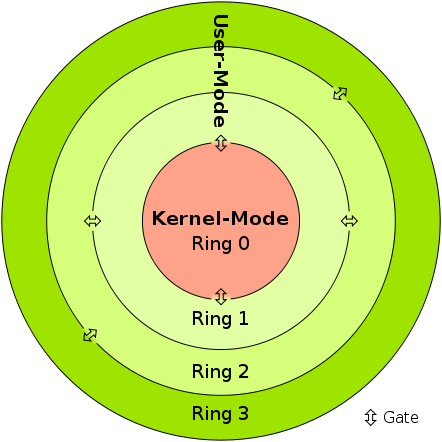
In kernel mode, the program has direct and unrestricted access to system resources.
In user mode, the application program executes and starts.
Interruptions
In Kernel mode, the whole operating system might go down if an interrupt occurs
In user mode, a single process fails if an interrupt occurs.
Modes
Kernel mode is also known as the master mode, privileged mode, or system mode.
User mode is also known as the unprivileged mode, restricted mode, or slave mode.
Virtual address space
In kernel mode, all processes share a single virtual address space.
In user mode, all processes get separate virtual address space.
Level of privilege
In kernel mode, the applications have more privileges as compared to user mode.
While in user mode the applications have fewer privileges.
Restrictions
As kernel mode can access both the user programs as well as the kernel programs there are no restrictions.
While user mode needs to access kernel programs as it cannot directly access them.
Mode bit value
The mode bit of kernel-mode is 0.
While; the mode bit of user-mode is 3.
Memory References
It is capable of referencing both memory areas.
It can only make references to memory allocated for user mode.
System Crash
A system crash in kernel mode is severe and makes things more complicated.
In user mode, a system crash can be recovered by simply resuming the session.
Access
Only essential functionality is permitted to operate in this mode.
User programs can access and execute in this mode for a given system.
Functionality
The kernel mode can refer to any memory block in the system and can also direct the CPU for the execution of an instruction, making it a very potent and significant mode.
The user mode is a standard and typical viewing mode, which implies that information cannot be executed on its own or reference any memory block; it needs an Application Protocol Interface (API) to achieve these things.
Basically, if the anti-cheat resides only in usermode, then the anti-cheat doesn’t have the total control of the system. If you manage to get into the kernelmode, then you can easily manipulate all objects and events in the usermode. However, it is not advised to do the whole cheat in the kernel alone. One single mistake can cause Blue Screen Of Death, but we do need the kernel to allow us for easy read and write on processes.
EPROCESS
The EPROCESS structure is an opaque structure that serves as the process object for a process.
Some routines, such as PsGetProcessCreateTimeQuadPart, use EPROCESS to identify the process to operate on. Drivers can use the PsGetCurrentProcess routine to obtain a pointer to the process object for the current process and can use the ObReferenceObjectByHandle routine to obtain a pointer to the process object that is associated with the specified handle. The PsInitialSystemProcess global variable points to the process object for the system process.
Note that a process object is an Object Manager object. Drivers should use Object Manager routines such as ObReferenceObject and ObDereferenceObject to maintain the object’s reference count.
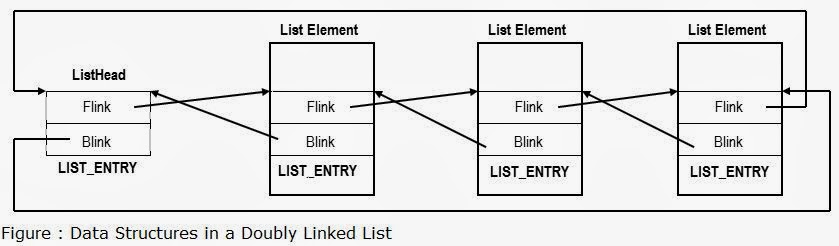
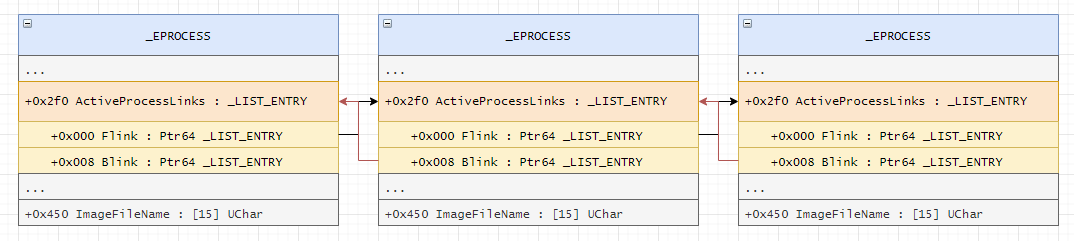
Each list element in LIST_ENTRY is linked towards the next application pointer (flink) and also backwards (blink) which then from a circular list pattern. Each application opened is added to the list, and removed also when closed.
Now here comes the juicy part!
Unlinking the process
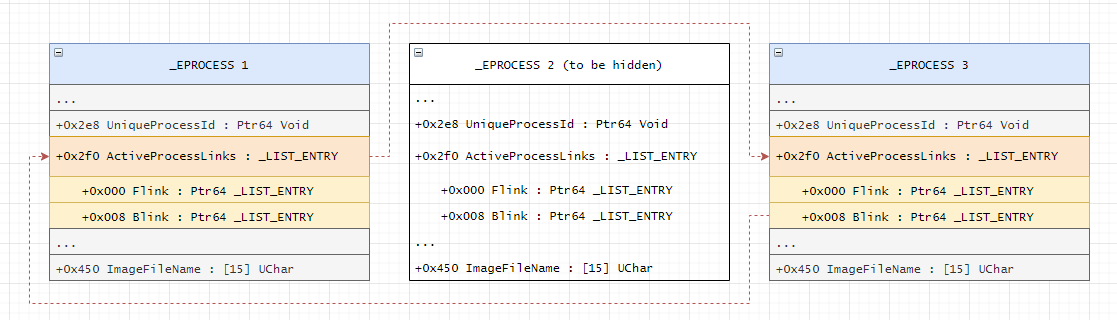
Basically, removing the pointer of an application in the ActiveProcessLinks, means the application will now be invisible from other process enumeration. But don’t get me wrong. This is still detectable especially when an anti-cheat have kernel driver because they can easily scan for unlinked patterns and/or perform memory pattern scanning.
A lot of rootkits use this method to hide their process.
adios
Visualization
Before / Original State
After Modification
Checkout this link for image credits and for also a different perspective of the attack.
Kernel Driver
NTSTATUS processHiderDeviceControl(PDEVICE_OBJECT, PIRP irp) {
	auto stack = IoGetCurrentIrpStackLocation(irp);
	auto status = STATUS_SUCCESS;

	switch (stack->Parameters.DeviceIoControl.IoControlCode) {
	case IOCTL_PROCESS_HIDE_BY_PID:
	{
		const auto size = stack->Parameters.DeviceIoControl.InputBufferLength;
		if (size != sizeof(HANDLE)) {
			status = STATUS_INVALID_BUFFER_SIZE;
		}
		const auto pid = *reinterpret_cast<HANDLE*>(stack->Parameters.DeviceIoControl.Type3InputBuffer);
		PEPROCESS eprocessAddress = nullptr;
		status = PsLookupProcessByProcessId(pid, &eprocessAddress);
		if (!NT_SUCCESS(status)) {
			KdPrint(("Failed to look for process by id (0x%08X)\n", status));
			break;
		}
Here, we can see that we are finding the eprocessAddress by using PsLookupProcessByProcessId. We will also get the offset by finding the pid in the struct. We know that ActiveProcessLinks is just below the UniqueProcessId. This might not be the best possible way because it may break on the future patches when a new element is inserted below UniqueProcessId.
Here is a table of offsets used by different windows versions if you want to use manual offsets rather than the method above.
Win7Sp0
0x188
Win7Sp1
0x188
Win8p1
0x2e8
Win10v1607
0x2f0
Win10v1703
0x2e8
Win10v1709
0x2e8
Win10v1803
0x2e8
Win10v1809
0x2e8
Win10v1903
0x2f0
Win10v1909
0x2f0
Win10v2004
0x448
Win10v20H1
0x448
Win10v2009
0x448
Win10v20H2
0x448
Win10v21H1
0x448
Win10v21H2
0x448
ActiveProcessLinks offsets
		auto addr = reinterpret_cast<HANDLE*>(eprocessAddress);
		LIST_ENTRY* activeProcessList = 0;
		for (SIZE_T offset = 0; offset < consts::MAX_EPROCESS_SIZE / sizeof(SIZE_T*); offset++) {
			if (addr[offset] == pid) {
				activeProcessList = reinterpret_cast<LIST_ENTRY*>(addr + offset + 1);
				break;
			}
		}

		if (!activeProcessList) {
			ObDereferenceObject(eprocessAddress);
			status = STATUS_UNSUCCESSFUL;
			break;
		}

		KdPrint(("Found address for ActiveProcessList! (0x%08X)\n", activeProcessList));

		if (activeProcessList->Flink == activeProcessList && activeProcessList->Blink == activeProcessList) {
			ObDereferenceObject(eprocessAddress);
			status = STATUS_ALREADY_COMPLETE;
			break;
		}

		LIST_ENTRY* prevProcess = activeProcessList->Blink;
		LIST_ENTRY* nextProcess = activeProcessList->Flink;

		prevProcess->Flink = nextProcess;
		nextProcess->Blink = prevProcess;
We also want the process-to-be-hidden to link on its own because the pointer might not exists anymore if the linked process dies.
There are 2 problems that you need to solve first before being able to do this method.
First: You need to disable Driver Signature Enforcement
You need to load your driver to be able to execute kernel functions. You either buy a certificate to sign your own driver so you do not need to disable DSE or you can just disable DSE from windows itself. The only problem of disabling DSE is that some games requires you to have enabled DSE before playing.
Second: Bypass Patchguard
Manually messing with DKOM will result you to BSOD. They got a tons of checks. But luckily we have some ways to bypass patchguard.
These 2 will be tackled on the 3rd part of the writeup. Stay tuned!
I just got finished the Bug Bounty Hunter Job Role path from HTB. At this point, I am eligible to take HTB Certified Bug Bounty Hunter (HTB CBBH) certification. But I feel that I am still not very much confident to take it. The exam cost $210 as of this writing and allow 2 attempts. The exam runs for 7 days without proctor and it is an open note and only the sky is the limit. Check this out for more info: https://academy.hackthebox.com/preview/certifications/htb-certified-bug-bounty-hunter/
Interestingly, HTB did release a new certification called HTB Certified Penetration Testing Specialist (HTB CPTS) and this is for completing the Junior Penetration Tester Job Role path.
I am thinking to complete the said path first then take HTB CPTS before going directly with OSCP as people rate that HTB is much more harder than OSCP.
Ironically, OSCP is more considered on industry and have a much higher employment value. Who knows? HTB is actually getting ramped up for competing with OSCP and other similar certifications.
My CCNA will be expired next year, so I have to take a higher certificate to automatically renew it. My target will be CCNP Security.
With that being said, here are my certifications that I’ve been dreaming a lot:
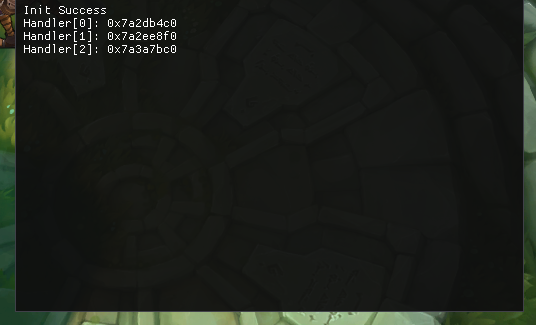
This writeup is just a PoC on getting the handlers list in win10. This PoC was done in Win10 build 19041.
VEH is used to catch exceptions happening in the application, when the exceptions are caught, you have a chance to resolve the exceptions to avoid application crash.
Credits
Almost this whole writeup is written by Dimitri Fourny and not my original writeup but some parts of it are modified as per my Win10 build version. Please kindly visit his blog to see the original writeup.
VEH usage example
LONG NTAPI MyVEHHandler(PEXCEPTION_POINTERS ExceptionInfo) {
  printf("MyVEHHandler (0x%x)\n", ExceptionInfo->ExceptionRecord->ExceptionCode);

  if (ExceptionInfo->ExceptionRecord->ExceptionCode == EXCEPTION_INT_DIVIDE_BY_ZERO) {
    printf("  Divide by zero at 0x%p\n", ExceptionInfo->ExceptionRecord->ExceptionAddress);
    ExceptionInfo->ContextRecord->Eip += 2;
    return EXCEPTION_CONTINUE_EXECUTION;
  }

  return EXCEPTION_CONTINUE_SEARCH;
}

int main() {
  AddVectoredExceptionHandler(1, MyVEHHandler);
  int except = 5;
  except /= 0;
  return 0;
}
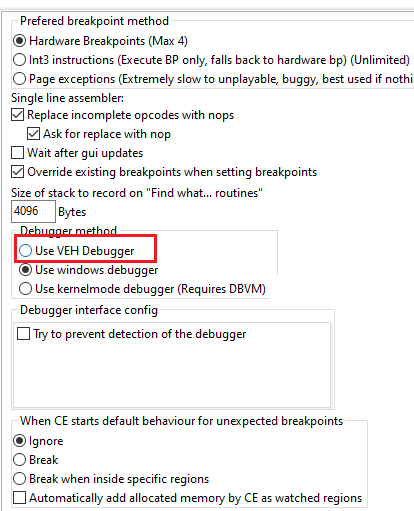
There are also applications that uses this method to other matters, such as Cheat Engine to bypass basic debugger checks.
Cheat Engine VEH Debugger
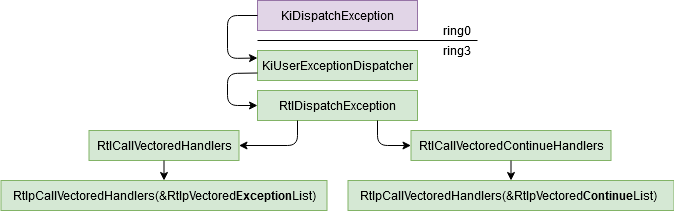
Exception Path
When a CPU exception occurs, the kernel will call the function KiDispatchException (ring0) which will follow this exception to the ntdll method KiUserExceptionDispatcher (ring3). This function will call RtlDispatchException which will try to handle it via the VEH. To do it, it will read the VEH chained list via RtlCallVectoredHandlers and calling each handlers until one return EXCEPTION_CONTINUE_EXECUTION. If a handler returned EXCEPTION_CONTINUE_EXECUTION, the function RtlCallVectoredContinueHandlers is called and it will call all the continue exception handlers.
Exception Path
The VEH handlers are important because the SEH handlers are called only if no VEH handler has caught the exception, so it could be the best method to catch all exceptions if you don’t want to hook KiUserExceptionDispatcher. If you want more information about the exceptions dispatcher, 0vercl0ck has made a good paper about it.
The chained list
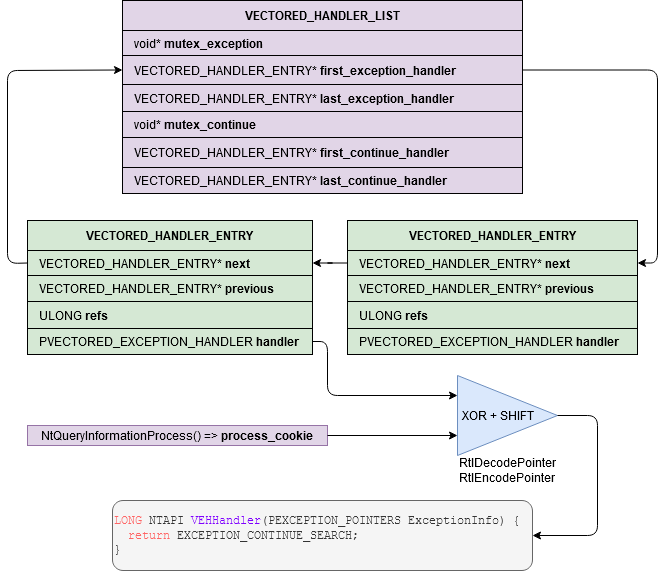
The VEH list is a circular linked list with the handlers functions pointers encoded:
Chained List
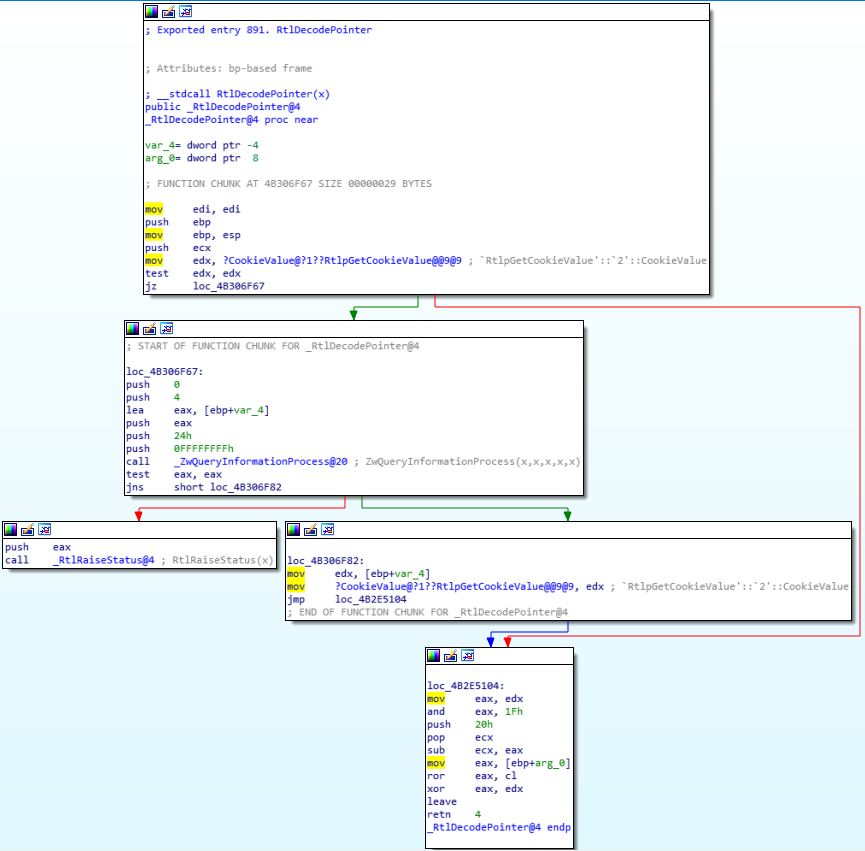
The exception handlers are encoded with a process cookie but you can decode them easily. If you are dumping the VEH which is inside your own process, you can just use DecodePointer and you don’t have to care about the process cookie. If it’s a remote process you can use DecodeRemotePointer but you will need to create your own function pointer with GetModuleHandle("kernel32.dll") and GetProcAddress("DecodeRemotePointer").
The solution that I have chosen is to imitate DecodePointer by getting the process cookie with ZwQueryProcessInformation and applying the same algorithm:
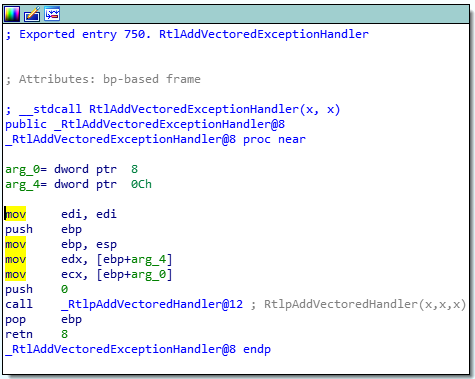
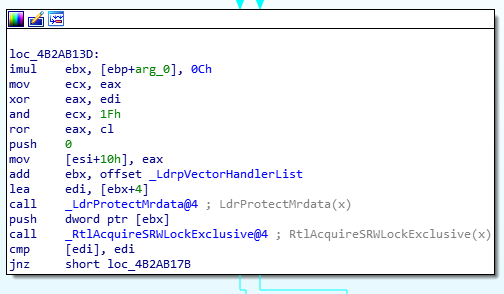
Even if you can find the symbol LdrpVectorHandlerList in the ntdll pdb, there is no official API to get it easily. My solution is to begin by getting a pointer to RtlpAddVectoredHandler:
RtlAddVectoredExceptionHandler
You can disassemble the method RtlAddVectoredExceptionHandler until you find the instruction call or you can just pretend that its address is always at 0x16 bytes after it:
With this, I can now walk through VEH and reverse what does the handlers do. Again, this is not my original writeup, all credits goes to Dimitri Fourny.