The goal of this writeup is to create an additional layer of defense versus analysis. A lot of malwares utilize this technique in order for the binary analysis make more harder.
Polymorphism is an important concept of object-oriented programming. It simply means more than one form. That is, the same entity (function or operator) behaves differently in different scenarios
www.programiz.com
We can implement polymorphism in C++ using the following ways:
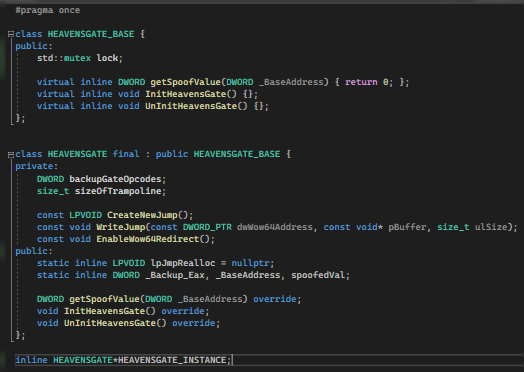
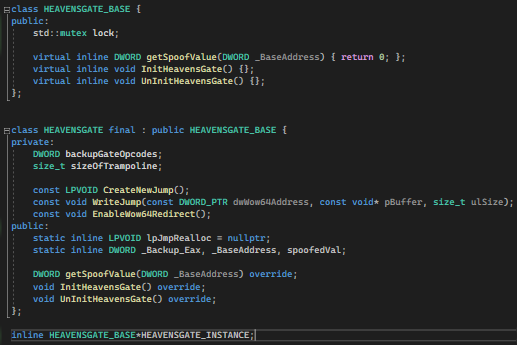
Now, let’s get it working. For this article, we are using a basic class named HEAVENSGATE_BASE and HEAVENSGATE.
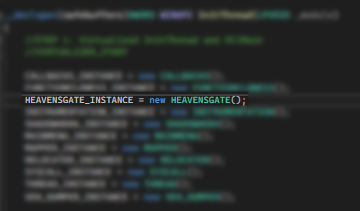
Fig1: Instantiation
Then we will be calling a function on an Instantiated Object.
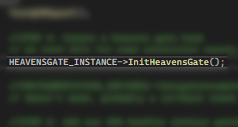
Fig2: Call to a function
Normal Declarations
Fig3: We have a pointer named HEAVENSGATE_INSTANCE.
When we examine the function call (Fig2) under IDA, we get the result of:
Fig4: Direct Call to HEAVENSGATE::InitHeavensGate
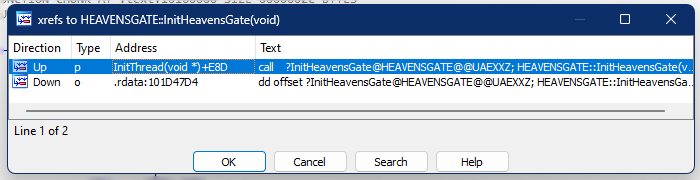
and when we cross-reference the functions, we will see on screen:
Fig5: xref HEAVENSGATE::InitHeavensGate
The xref on the .rdata is a call from VirtualTable of the Instantiated object. And the xref on the InitThread is a call to the function (Fig2).
Basic Obfuscation
So, how do we apply basic obfuscation?
We just need to change the declaration of Object to be the “_BASE” level.
Fig6: A pointer named HEAVENSGATE_INSTANCE pointer to HEAVENSGATE_BASE
Unlike earlier, the pointer points to a class named HEAVENSGATE. But this time we will be using the “_BASE”.
Under the IDA, we can see the following instructions:
Fig7: Obfuscated call
Well, technically, it isn’t obfuscated. But the thing is, when an analyzer doesn’t have the .pdb file which contains the symbols name, then it will be harder to follow the calls and purpose of a certain call without using debugger.
This disassembly shows exactly what is going on under the hood with relation to polymorphism. For the invocations of function, the compiler moves the address of the object in to the EDX register. This is then dereferenced to get the base of the VMT and stored in the EAX register. The appropriate VMT entry for the function is found by using EAX as an index and storing the address in EDX. This function is then called. Since HEAVENSGATE_BASE and HEAVENSGATE have different VMTs, this code will call different functions — the appropriate ones — for the appropriate object type. Seeing how it’s done under the hood also allows us to easily write a function to print the VMT.
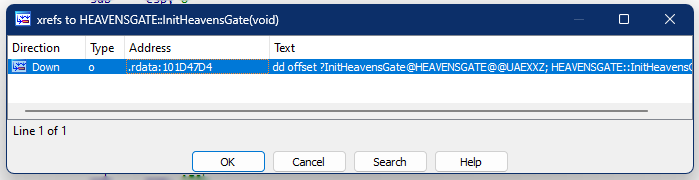
Fig8: Direct function call is now gone
We can now just see that the direct call (in comparison with Fig5) is now gone. Traces and footprints will be harder to be traced.
Conclusion
Dividing the classes into two: a Base and the Original class, is a time consuming task. It also make the code looks ugly. But somehow, it can greatly add protection to our binary from analysis.
This won’t get too long. Just a quick fix for heavens gate hook (http://mark.rxmsolutions.com/through-the-heavens-gate/) as Microsoft updates the wow64cpu.dll that manages the translation from 32bit to 64bit syscalls of WoW64 applications.
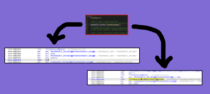
To better visualize the change, here is the comparison of before and after.
Prior to 22h2, down until win10.
win11 22h2
With that being said, you cannot place a hook on 0x3010 as it would take a size of 8 bytes replacement. And would destroy the call mechanism even if you fix the displacement of call.
The solution
The solution is pretty simple. As in very very simple. Copy all the bytes from 0x3010 down until 0x302D. Fix the displacement only for the copied jmp at 0x3028. Then place the hook at 0x3010. Basically, the copied gate (via VirtualAlloc or Codecave) will continue execution from original 0x3010. And so, the original 0x3015 and onwards will not be executed ever again.
Pretty easy right?
Notes
In the past, Microsoft tends to use far jump to set the CS:33. CS:33 signify that the execution will be a long 64 bit mode in order to translate from 32bit to 64bit. Now, they managed to create bridge without the need for far jmp. Lot of readings need to be cited in order to understand these new mechanism but please do let me know!
I am now close at finishing the HTB Junior Pentester role course but decided to take a quick brake and focus on one of my favorite fields: reversing games and evading anti-cheat.
The goal
The end goal is simple, to bypass the Cheat Engine for usermode anti-cheats and allow us to debug a game using type-1 hypervisor.
This writeup will be divided into 3 parts.
First will be the concept of Direct Kernel Object Manipulation to make a process unlink from eprocess struct.
Second, the concept of hypervisor for debugging.
And lastly, is the concept of Patchguard, Driver Signature Enforcement and how to disable those.
So without further ado, let’s get our hands dirty!
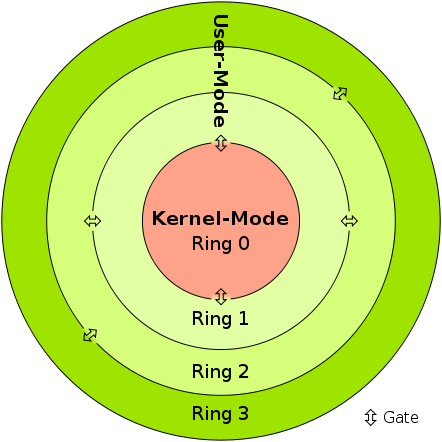
In kernel mode, the program has direct and unrestricted access to system resources.
In user mode, the application program executes and starts.
Interruptions
In Kernel mode, the whole operating system might go down if an interrupt occurs
In user mode, a single process fails if an interrupt occurs.
Modes
Kernel mode is also known as the master mode, privileged mode, or system mode.
User mode is also known as the unprivileged mode, restricted mode, or slave mode.
Virtual address space
In kernel mode, all processes share a single virtual address space.
In user mode, all processes get separate virtual address space.
Level of privilege
In kernel mode, the applications have more privileges as compared to user mode.
While in user mode the applications have fewer privileges.
Restrictions
As kernel mode can access both the user programs as well as the kernel programs there are no restrictions.
While user mode needs to access kernel programs as it cannot directly access them.
Mode bit value
The mode bit of kernel-mode is 0.
While; the mode bit of user-mode is 3.
Memory References
It is capable of referencing both memory areas.
It can only make references to memory allocated for user mode.
System Crash
A system crash in kernel mode is severe and makes things more complicated.
In user mode, a system crash can be recovered by simply resuming the session.
Access
Only essential functionality is permitted to operate in this mode.
User programs can access and execute in this mode for a given system.
Functionality
The kernel mode can refer to any memory block in the system and can also direct the CPU for the execution of an instruction, making it a very potent and significant mode.
The user mode is a standard and typical viewing mode, which implies that information cannot be executed on its own or reference any memory block; it needs an Application Protocol Interface (API) to achieve these things.
Basically, if the anti-cheat resides only in usermode, then the anti-cheat doesn’t have the total control of the system. If you manage to get into the kernelmode, then you can easily manipulate all objects and events in the usermode. However, it is not advised to do the whole cheat in the kernel alone. One single mistake can cause Blue Screen Of Death, but we do need the kernel to allow us for easy read and write on processes.
EPROCESS
The EPROCESS structure is an opaque structure that serves as the process object for a process.
Some routines, such as PsGetProcessCreateTimeQuadPart, use EPROCESS to identify the process to operate on. Drivers can use the PsGetCurrentProcess routine to obtain a pointer to the process object for the current process and can use the ObReferenceObjectByHandle routine to obtain a pointer to the process object that is associated with the specified handle. The PsInitialSystemProcess global variable points to the process object for the system process.
Note that a process object is an Object Manager object. Drivers should use Object Manager routines such as ObReferenceObject and ObDereferenceObject to maintain the object’s reference count.
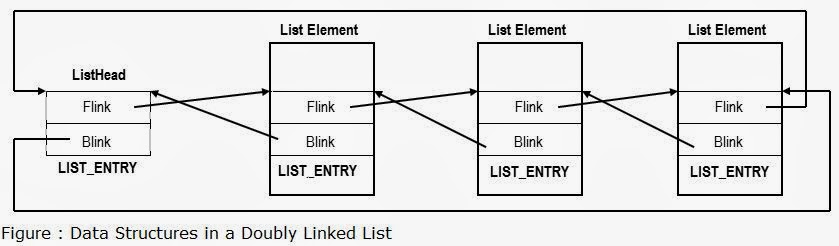
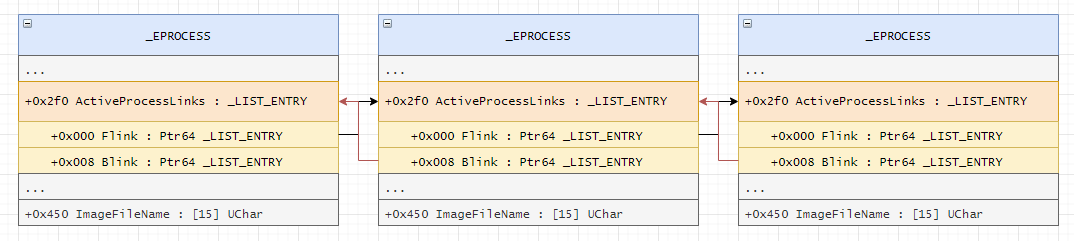
Each list element in LIST_ENTRY is linked towards the next application pointer (flink) and also backwards (blink) which then from a circular list pattern. Each application opened is added to the list, and removed also when closed.
Now here comes the juicy part!
Unlinking the process
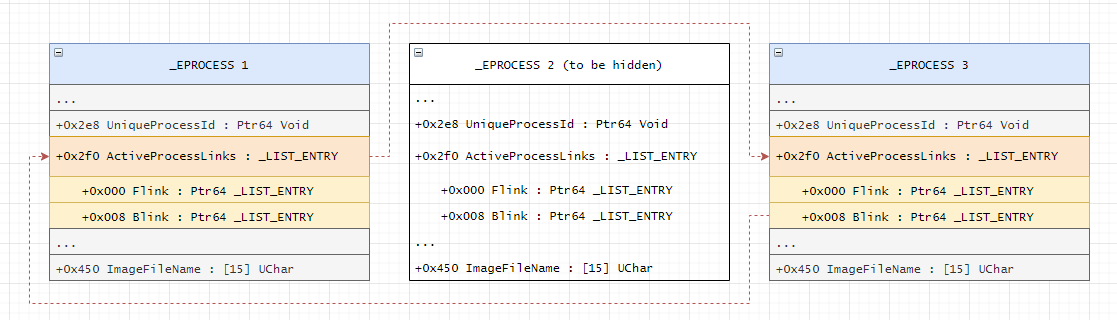
Basically, removing the pointer of an application in the ActiveProcessLinks, means the application will now be invisible from other process enumeration. But don’t get me wrong. This is still detectable especially when an anti-cheat have kernel driver because they can easily scan for unlinked patterns and/or perform memory pattern scanning.
A lot of rootkits use this method to hide their process.
adios
Visualization
Before / Original State
After Modification
Checkout this link for image credits and for also a different perspective of the attack.
Kernel Driver
NTSTATUS processHiderDeviceControl(PDEVICE_OBJECT, PIRP irp) {
	auto stack = IoGetCurrentIrpStackLocation(irp);
	auto status = STATUS_SUCCESS;

	switch (stack->Parameters.DeviceIoControl.IoControlCode) {
	case IOCTL_PROCESS_HIDE_BY_PID:
	{
		const auto size = stack->Parameters.DeviceIoControl.InputBufferLength;
		if (size != sizeof(HANDLE)) {
			status = STATUS_INVALID_BUFFER_SIZE;
		}
		const auto pid = *reinterpret_cast<HANDLE*>(stack->Parameters.DeviceIoControl.Type3InputBuffer);
		PEPROCESS eprocessAddress = nullptr;
		status = PsLookupProcessByProcessId(pid, &eprocessAddress);
		if (!NT_SUCCESS(status)) {
			KdPrint(("Failed to look for process by id (0x%08X)\n", status));
			break;
		}
Here, we can see that we are finding the eprocessAddress by using PsLookupProcessByProcessId. We will also get the offset by finding the pid in the struct. We know that ActiveProcessLinks is just below the UniqueProcessId. This might not be the best possible way because it may break on the future patches when a new element is inserted below UniqueProcessId.
Here is a table of offsets used by different windows versions if you want to use manual offsets rather than the method above.
Win7Sp0
0x188
Win7Sp1
0x188
Win8p1
0x2e8
Win10v1607
0x2f0
Win10v1703
0x2e8
Win10v1709
0x2e8
Win10v1803
0x2e8
Win10v1809
0x2e8
Win10v1903
0x2f0
Win10v1909
0x2f0
Win10v2004
0x448
Win10v20H1
0x448
Win10v2009
0x448
Win10v20H2
0x448
Win10v21H1
0x448
Win10v21H2
0x448
ActiveProcessLinks offsets
		auto addr = reinterpret_cast<HANDLE*>(eprocessAddress);
		LIST_ENTRY* activeProcessList = 0;
		for (SIZE_T offset = 0; offset < consts::MAX_EPROCESS_SIZE / sizeof(SIZE_T*); offset++) {
			if (addr[offset] == pid) {
				activeProcessList = reinterpret_cast<LIST_ENTRY*>(addr + offset + 1);
				break;
			}
		}

		if (!activeProcessList) {
			ObDereferenceObject(eprocessAddress);
			status = STATUS_UNSUCCESSFUL;
			break;
		}

		KdPrint(("Found address for ActiveProcessList! (0x%08X)\n", activeProcessList));

		if (activeProcessList->Flink == activeProcessList && activeProcessList->Blink == activeProcessList) {
			ObDereferenceObject(eprocessAddress);
			status = STATUS_ALREADY_COMPLETE;
			break;
		}

		LIST_ENTRY* prevProcess = activeProcessList->Blink;
		LIST_ENTRY* nextProcess = activeProcessList->Flink;

		prevProcess->Flink = nextProcess;
		nextProcess->Blink = prevProcess;
We also want the process-to-be-hidden to link on its own because the pointer might not exists anymore if the linked process dies.
There are 2 problems that you need to solve first before being able to do this method.
First: You need to disable Driver Signature Enforcement
You need to load your driver to be able to execute kernel functions. You either buy a certificate to sign your own driver so you do not need to disable DSE or you can just disable DSE from windows itself. The only problem of disabling DSE is that some games requires you to have enabled DSE before playing.
Second: Bypass Patchguard
Manually messing with DKOM will result you to BSOD. They got a tons of checks. But luckily we have some ways to bypass patchguard.
These 2 will be tackled on the 3rd part of the writeup. Stay tuned!
Data Execution Prevention (DEP) is a system-level memory protection feature that is built into the operating system starting with Windows XP and Windows Server 2003. DEP enables the system to mark one or more pages of memory as non-executable. Marking memory regions as non-executable means that code cannot be run from that region of memory, which makes it harder for the exploitation of buffer overruns.
DEP prevents code from being run from data pages such as the default heap, stacks, and memory pools. If an application attempts to run code from a data page that is protected, a memory access violation exception occurs, and if the exception is not handled, the calling process is terminated.
DEP is not intended to be a comprehensive defense against all exploits; it is intended to be another tool that you can use to secure your application.
If an application attempts to run code from a protected page, the application receives an exception with the status code STATUS_ACCESS_VIOLATION. If your application must run code from a memory page, it must allocate and set the proper virtual memory protection attributes. The allocated memory must be marked PAGE_EXECUTE, PAGE_EXECUTE_READ, PAGE_EXECUTE_READWRITE, or PAGE_EXECUTE_WRITECOPY when allocating memory. Heap allocations made by calling the malloc and HeapAlloc functions are non-executable.
Applications cannot run code from the default process heap or the stack.
DEP is configured at system boot according to the no-execute page protection policy setting in the boot configuration data. An application can get the current policy setting by calling the GetSystemDEPPolicy function. Depending on the policy setting, an application can change the DEP setting for the current process by calling the SetProcessDEPPolicy function.
An array of additional arguments that describe the exception. The RaiseException function can specify this array of arguments. For most exception codes, the array elements are undefined. The following table describes the exception codes whose array elements are defined.
Exception code
Meaning
EXCEPTION_ACCESS_VIOLATION
The first element of the array contains a read-write flag that indicates the type of operation that caused the access violation. If this value is zero, the thread attempted to read the inaccessible data. If this value is 1, the thread attempted to write to an inaccessible address.If this value is 8, the thread causes a user-mode data execution prevention (DEP) violation. The second array element specifies the virtual address of the inaccessible data.
EXCEPTION_IN_PAGE_ERROR
The first element of the array contains a read-write flag that indicates the type of operation that caused the access violation. If this value is zero, the thread attempted to read the inaccessible data. If this value is 1, the thread attempted to write to an inaccessible address.If this value is 8, the thread causes a user-mode data execution prevention (DEP) violation. The second array element specifies the virtual address of the inaccessible data. The third array element specifies the underlying NTSTATUS code that resulted in the exception.
Set the target address into PAGE_READONLY so that if the address tries to execute/write, then it would result to an exception where we can catch the exception using VEH handler.
LONG WINAPI UltimateHooks::LeoHandler(EXCEPTION_POINTERS* pExceptionInfo)
{
	if (pExceptionInfo->ExceptionRecord->ExceptionCode == EXCEPTION_ACCESS_VIOLATION)
	{
		for (HookEntries hs : hookEntries)
		{
			if ((hs.addressToHook == pExceptionInfo->ContextRecord->XIP) &&
				(pExceptionInfo->ExceptionRecord->ExceptionInformation[0] == 8)) {
				//do your dark rituals here
			}
			return EXCEPTION_CONTINUE_EXECUTION;
		}

	}
	return EXCEPTION_CONTINUE_SEARCH;
}
As you can see, you just have to compare the ExceptionInformation[0] if it is 8 to verify if the exception is caused by DEP.
Simple AF!
What can I do with this?
Change the execution flow, modify the stack, modify values, mutate, and anything your imagination can think of! Just use your creativity!
POC
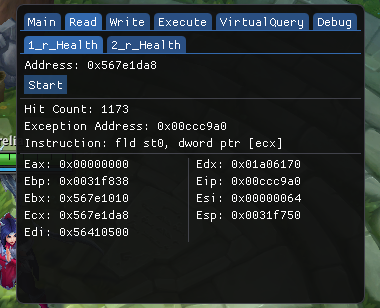
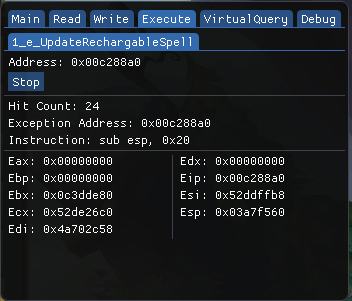
VEH DebuggerVEH DebuggerVEH Debugger via DEP
Conclusion
Thanks for viewing this, I hope you enjoyed this small writeup. Its been a while since I posted writeups, and may post again on some quite time. I am now currently shifting to Linux environment, should you expect that I will be having writeups on Linux, Web, Network, and Pentesting!
I am also planning to get some certifications such as CEH and OSCP, but I am not quite sure yet. But who knows? Ill just update it here whenever I came to a finalization.
Okay, so here is a small snippet that you can use for injecting a DLL on an application via “Thread Hijacking”. It’s much safer than injecting with common methods such as CreateRemoteThread. This uses GetThreadContext and SetThreadContext to poison the registers to execute our stub that is allocated via VirtualAllocEx which contains a code that will execute LoadLibraryA that will load our DLL. But this snippet alone is not enough to make your dll injection safe, you can do cleaning of your traces upon injection and other methods. Thanks to thelastpenguin for this awesome base.
FULL CODE
#include <fstream>
#include <iostream>
#include <stdio.h>
#include <Windows.h>
#include <TlHelp32.h>
#include <direct.h> // _getcwd
#include <string>
#include <iomanip>
#include <sstream>
#include <process.h>

#include <unordered_set>

#include "makesyscall.h"
#pragma comment(lib,"ntdll.lib")


using namespace std;

DWORD FindProcessId(const std::wstring&);
long InjectProcess(DWORD, const char*);

void dotdotdot(int count, int delay = 250);
void cls();

int main_scanner();
int main_injector();

string GetExeFileName();
string GetExePath();

BOOL IsAppRunningAsAdminMode();
void ElevateApplication();

__declspec(naked) void stub()
{
	__asm
	{
		// Save registers

		pushad
			pushfd
			call start // Get the delta offset

		start :
		pop ecx
			sub ecx, 7

			lea eax, [ecx + 32] // 32 = Code length + 11 int3 + 1
			push eax
			call dword ptr[ecx - 4] // LoadLibraryA address is stored before the shellcode

			// Restore registers

			popfd
			popad
			ret

			// 11 int3 instructions here
	}
}

// this way we can difference the addresses of the instructions in memory
DWORD WINAPI stub_end()
{
	return 0;
}
//

int main(int argc, char* argv) {
	main_injector();
	main_scanner();
}

BOOL IsAppRunningAsAdminMode()
{
	BOOL fIsRunAsAdmin = FALSE;
	DWORD dwError = ERROR_SUCCESS;
	PSID pAdministratorsGroup = NULL;

	// Allocate and initialize a SID of the administrators group.
	SID_IDENTIFIER_AUTHORITY NtAuthority = SECURITY_NT_AUTHORITY;
	if (!AllocateAndInitializeSid(
		&NtAuthority,
		2,
		SECURITY_BUILTIN_DOMAIN_RID,
		DOMAIN_ALIAS_RID_ADMINS,
		0, 0, 0, 0, 0, 0,
		&pAdministratorsGroup))
	{
		dwError = GetLastError();
		goto Cleanup;
	}

	// Determine whether the SID of administrators group is enabled in
	// the primary access token of the process.
	if (!CheckTokenMembership(NULL, pAdministratorsGroup, &fIsRunAsAdmin))
	{
		dwError = GetLastError();
		goto Cleanup;
	}

Cleanup:
	// Centralized cleanup for all allocated resources.
	if (pAdministratorsGroup)
	{
		FreeSid(pAdministratorsGroup);
		pAdministratorsGroup = NULL;
	}

	// Throw the error if something failed in the function.
	if (ERROR_SUCCESS != dwError)
	{
		throw dwError;
	}

	return fIsRunAsAdmin;
}
//

void ElevateApplication(){
	wchar_t szPath[MAX_PATH];
	if (GetModuleFileName(NULL, szPath, ARRAYSIZE(szPath)))
	{
		// Launch itself as admin
		SHELLEXECUTEINFO sei = { sizeof(sei) };
		sei.lpVerb = L"runas";
		sei.lpFile = szPath;
		sei.hwnd = NULL;
		sei.nShow = SW_NORMAL;
		if (!ShellExecuteEx(&sei))
		{
			DWORD dwError = GetLastError();
			if (dwError == ERROR_CANCELLED)
			{
				// The user refused to allow privileges elevation.
				std::cout << "User did not allow elevation" << std::endl;
			}
		}
		else
		{
			_exit(1);  // Quit itself
		}
	}
}

string GetExeFileName()
{
	char buffer[MAX_PATH];
	GetModuleFileNameA(NULL, buffer, MAX_PATH);
	return std::string(buffer);
}

string GetExePath()
{
	std::string f = GetExeFileName();
	return f.substr(0, f.find_last_of("\\/"));
}

int main_scanner() {
	std::cout << "Loading";
	dotdotdot(4);
	std::cout << endl;

	cls();

	string processName = "Game.exe";
	string payloadPath = GetExePath() + "\\" + "hack.dll";

	cls();
	std::cout << "\tProcess Name: " << processName << endl;
	std::cout << "\tRelative Path: " << payloadPath << endl;

	std::wstring fatProcessName(processName.begin(), processName.end());

	std::unordered_set<DWORD> injectedProcesses;


	while (true) {
		std::cout << "Scanning";
		while (true) {
			dotdotdot(4);

			DWORD processId = FindProcessId(fatProcessName);
			if (processId && injectedProcesses.find(processId) == injectedProcesses.end()) {
				std::cout << "\n====================\n";
				std::cout << "Found a process to inject!" << endl;
				std::cout << "Process ID: " << processId << endl;
				std::cout << "Injecting Process: " << endl;

				if (InjectProcess(processId, payloadPath.c_str()) == 0) {
					std::cout << "Success!" << endl;
					injectedProcesses.insert(processId);
				}
				else {
					std::cout << "Error!" << endl;
				}
				std::cout << "====================\n";
				break;
			}
		}
	}
}

int main_injector() {
	cls();

	if (IsAppRunningAsAdminMode())
		return 1;
	else
		ElevateApplication();
}

void dotdotdot(int count, int delay) {
	int width = count;
	for (int dots = 0; dots <= count; ++dots) {
		std::cout << std::left << std::setw(width) << std::string(dots, '.');
		Sleep(delay);
		std::cout << std::string(width, '\b');
	}
}

void cls() {
	std::system("cls");
	std::cout <<
		" -------------------------------\n"
		"  Thread Hijacking Injector \n"

		" -------------------------------\n";
}

DWORD FindProcessId(const std::wstring& processName) {
	PROCESSENTRY32 processInfo;
	processInfo.dwSize = sizeof(processInfo);

	HANDLE processesSnapshot = CreateToolhelp32Snapshot(TH32CS_SNAPPROCESS, NULL);
	if (processesSnapshot == INVALID_HANDLE_VALUE)
		return 0;

	Process32First(processesSnapshot, &processInfo);
	if (!processName.compare(processInfo.szExeFile))
	{
		CloseHandle(processesSnapshot);
		return processInfo.th32ProcessID;
	}

	while (Process32Next(processesSnapshot, &processInfo))
	{
		if (!processName.compare(processInfo.szExeFile))
		{
			CloseHandle(processesSnapshot);
			return processInfo.th32ProcessID;
		}
	}

	CloseHandle(processesSnapshot);
	return 0;
}


long InjectProcess(DWORD ProcessId, const char* dllPath) {

	HANDLE hProcess, hThread, hSnap;
	DWORD stublen;
	PVOID LoadLibraryA_Addr, mem;

	THREADENTRY32 te32;
	CONTEXT ctx;

	// determine the size of the stub that we will insert
	stublen = (DWORD)stub_end - (DWORD)stub;
	cout << "Calculated the stub size to be: " << stublen << endl;


	// opening target process
	hProcess = OpenProcess(PROCESS_ALL_ACCESS, FALSE, ProcessId);

	if (!hProcess) {
		cout << "Failed to load hProcess with id " << ProcessId << endl;
		Sleep(10000);
		return 0;
	}

	// todo: identify purpose of this code
	te32.dwSize = sizeof(te32);
	hSnap = CreateToolhelp32Snapshot(TH32CS_SNAPTHREAD, 0);


	Thread32First(hSnap, &te32);
	cout << "Identifying a thread to hijack" << endl;
	while (Thread32Next(hSnap, &te32))
	{
		if (te32.th32OwnerProcessID == ProcessId)
		{
			cout << "Target thread found. TID: " << te32.th32ThreadID << endl;

			CloseHandle(hSnap);
			break;
		}
	}

	// opening a handle to the thread that we will be hijacking
	hThread = OpenThread(THREAD_ALL_ACCESS, false, te32.th32ThreadID);
	if (!hThread) {
		cout << "Failed to open a handle to the thread " << te32.th32ThreadID << endl;
		Sleep(10000);
		return 0;
	}

	// now we suspend it.
	ctx.ContextFlags = CONTEXT_FULL;
	SuspendThread(hThread);

	cout << "Getting the thread context" << endl;
	if (!GetThreadContext(hThread, &ctx)) // Get the thread context
	{
		cout << "Unable to get the thread context of the target thread " << GetLastError() << endl;
		ResumeThread(hThread);
		Sleep(10000);
		return -1;
	}

	cout << "Current EIP: " << ctx.Eip << endl;
	cout << "Current ESP: " << ctx.Esp << endl;

	cout << "Allocating memory in target process." << endl;
	mem = VirtualAllocEx(hProcess, NULL, 4096, MEM_COMMIT | MEM_RESERVE, PAGE_EXECUTE_READWRITE);

	if (!mem) {
		cout << "Unable to reserve memory in the target process." << endl;
		ResumeThread(hThread);
		Sleep(10000);
		return -1;
	}

	cout << "Memory allocated at " << mem << endl;
	LoadLibraryA_Addr = LoadLibraryA;

	cout << "Writing shell code, LoadLibraryA address, and DLL path into target process" << endl;

	cout << "Writing out path buffer " << dllPath << endl;
	size_t dllPathLen = strlen(dllPath);

	WriteProcessMemory(hProcess, mem, &LoadLibraryA_Addr, sizeof(PVOID), NULL); // Write the address of LoadLibraryA into target process
	WriteProcessMemory(hProcess, (PVOID)((LPBYTE)mem + 4), stub, stublen, NULL); // Write the shellcode into target process
	WriteProcessMemory(hProcess, (PVOID)((LPBYTE)mem + 4 + stublen), dllPath, dllPathLen, NULL); // Write the DLL path into target process

	ctx.Esp -= 4; // Decrement esp to simulate a push instruction. Without this the target process will crash when the shellcode returns!
	WriteProcessMemory(hProcess, (PVOID)ctx.Esp, &ctx.Eip, sizeof(PVOID), NULL); // Write orginal eip into target thread's stack
	ctx.Eip = (DWORD)((LPBYTE)mem + 4); // Set eip to the injected shellcode

	cout << "new eip value: " << ctx.Eip << endl;
	cout << "new esp value: " << ctx.Esp << endl;

	cout << "Setting the thread context " << endl;

	if (!SetThreadContext(hThread, &ctx)) // Hijack the thread
	{
		cout << "Unable to SetThreadContext" << endl;
		VirtualFreeEx(hProcess, mem, 0, MEM_RELEASE);
		ResumeThread(hThread);
		Sleep(10000);
		return -1;
	}

	ResumeThread(hThread);

	cout << "Done." << endl;

	return 0;
}
PoC
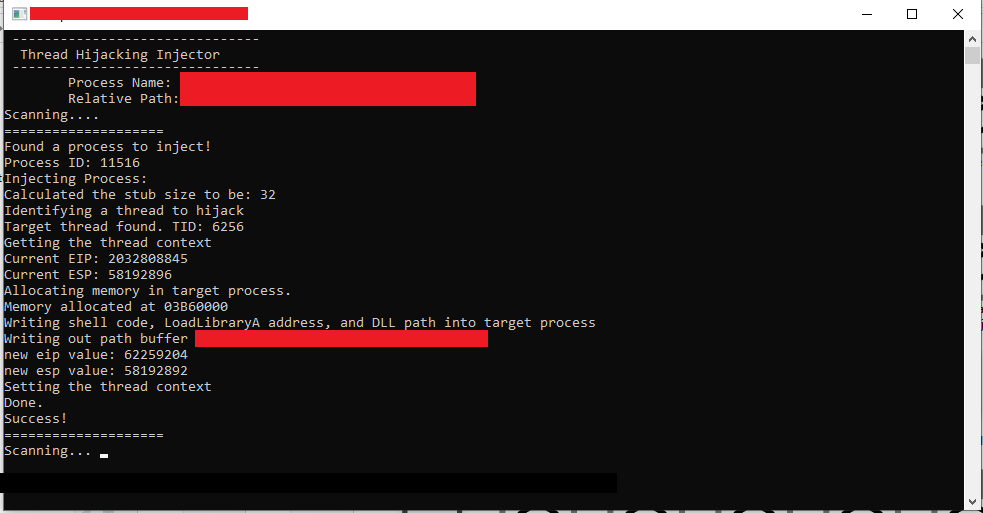
Thread Hijacking PoC
I think that’s all for this writeup. With that being said, this could be my last writeup for now as I am going very very busy for the next couple of months.
Thank you so much, and I hope you enjoyed this writeup!