Abusing Windows Data Executing Privacy (DEP)

Data Execution Prevention (DEP) is a system-level memory protection feature that is built into the operating system starting with Windows XP and Windows Server 2003. DEP enables the system to mark one or more pages of memory as non-executable. Marking memory regions as non-executable means that code cannot be run from that region of memory, which makes it harder for the exploitation of buffer overruns.

DEP prevents code from being run from data pages such as the default heap, stacks, and memory pools. If an application attempts to run code from a data page that is protected, a memory access violation exception occurs, and if the exception is not handled, the calling process is terminated.

DEP is not intended to be a comprehensive defense against all exploits; it is intended to be another tool that you can use to secure your application.

https://docs.microsoft.com/en-us/windows/win32/memory/data-execution-prevention

How Data Execution Prevention Works

If an application attempts to run code from a protected page, the application receives an exception with the status code STATUS_ACCESS_VIOLATION. If your application must run code from a memory page, it must allocate and set the proper virtual memory protection attributes. The allocated memory must be marked PAGE_EXECUTEPAGE_EXECUTE_READPAGE_EXECUTE_READWRITE, or PAGE_EXECUTE_WRITECOPY when allocating memory. Heap allocations made by calling the malloc and HeapAlloc functions are non-executable.

Applications cannot run code from the default process heap or the stack.

DEP is configured at system boot according to the no-execute page protection policy setting in the boot configuration data. An application can get the current policy setting by calling the GetSystemDEPPolicy function. Depending on the policy setting, an application can change the DEP setting for the current process by calling the SetProcessDEPPolicy function.

https://docs.microsoft.com/en-us/windows/win32/api/winnt/ns-winnt-exception_record

EXCEPTION_RECORD

typedef struct _EXCEPTION_RECORD {
  DWORD                    ExceptionCode;
  DWORD                    ExceptionFlags;
  struct _EXCEPTION_RECORD *ExceptionRecord;
  PVOID                    ExceptionAddress;
  DWORD                    NumberParameters;
  ULONG_PTR                ExceptionInformation[EXCEPTION_MAXIMUM_PARAMETERS];
} EXCEPTION_RECORD;

ExceptionInformation

An array of additional arguments that describe the exception. The RaiseException function can specify this array of arguments. For most exception codes, the array elements are undefined. The following table describes the exception codes whose array elements are defined.

Exception codeMeaning
EXCEPTION_ACCESS_VIOLATIONThe first element of the array contains a read-write flag that indicates the type of operation that caused the access violation. If this value is zero, the thread attempted to read the inaccessible data. If this value is 1, the thread attempted to write to an inaccessible address.If this value is 8, the thread causes a user-mode data execution prevention (DEP) violation.
The second array element specifies the virtual address of the inaccessible data.
EXCEPTION_IN_PAGE_ERRORThe first element of the array contains a read-write flag that indicates the type of operation that caused the access violation. If this value is zero, the thread attempted to read the inaccessible data. If this value is 1, the thread attempted to write to an inaccessible address.If this value is 8, the thread causes a user-mode data execution prevention (DEP) violation.
The second array element specifies the virtual address of the inaccessible data.
The third array element specifies the underlying NTSTATUS code that resulted in the exception.
ExceptionInformation table

The abuse!

VirtualProtect(&addr, &size, PAGE_READONLY, &hs.addressToHookOldProtect);

Set the target address into PAGE_READONLY so that if the address tries to execute/write, then it would result to an exception where we can catch the exception using VEH handler.

LONG WINAPI UltimateHooks::LeoHandler(EXCEPTION_POINTERS* pExceptionInfo)
{
	if (pExceptionInfo->ExceptionRecord->ExceptionCode == EXCEPTION_ACCESS_VIOLATION)
	{
		for (HookEntries hs : hookEntries)
		{
			if ((hs.addressToHook == pExceptionInfo->ContextRecord->XIP) &&
				(pExceptionInfo->ExceptionRecord->ExceptionInformation[0] == 8)) {
				//do your dark rituals here
			}
			return EXCEPTION_CONTINUE_EXECUTION;
		}

	}
	return EXCEPTION_CONTINUE_SEARCH;
}

As you can see, you just have to compare the ExceptionInformation[0] if it is 8 to verify if the exception is caused by DEP.

Simple AF!

What can I do with this?

Change the execution flow, modify the stack, modify values, mutate, and anything your imagination can think of! Just use your creativity!

POC
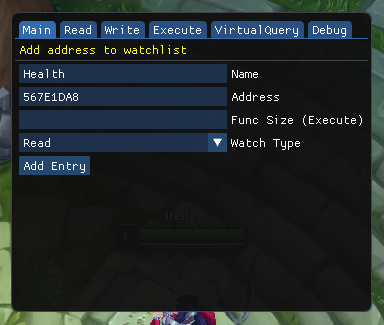
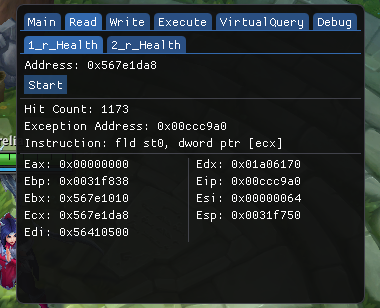
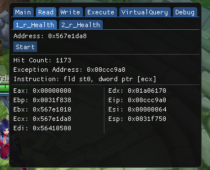
VEH Debugger
VEH Debugger
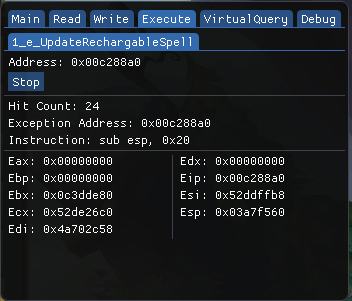
VEH Debugger via DEP

Conclusion

Thanks for viewing this, I hope you enjoyed this small writeup. Its been a while since I posted writeups, and may post again on some quite time. I am now currently shifting to Linux environment, should you expect that I will be having writeups on Linux, Web, Network, and Pentesting!

I am also planning to get some certifications such as CEH and OSCP, but I am not quite sure yet. But who knows? Ill just update it here whenever I came to a finalization.

Thanks and have a good day!~
Through the Heaven’s Gate

Really, the title does not literary means it. This writeup is about a research but not mine. And you will see why this writeup is called “Through the Heaven’s Gate” later on.

Background

My interest in this topic started from reversing a game. This game hooks many userland functions including the ones I’m interested in, VirtualProtect and NtVirtualProtectMemory. Without this, I am unable to change protection on pages and such.

This pushes me to resolve my need via kernel driver. I map my own kernel and execute a ZwVirtualprotectmemory from there, sure, it worked. But I want to make everything stay in usermode as their Anti-cheat just stays too in ring3.

The path to solution

Luckily, I have some several contacts that helps me to resolve me problem.

Me: How can I use VirtualProtect or NtVirtualProtectMemory when it's hooked at all.
az: use syscall
Me: *after some quite time* I can't find decent articles about syscall.
az: You can syscall, and since league is wow64, you can do heaven's gate on it
Me: ???

After that conversation I was like, “WHAAAATT???”. So I then proceed to read some articles regarding this. I’m thankful to this person because he does not give the solution directly, but he did point me to the process on how I can formulate the solution. So let’s break it down!

Syscall

In computing, a system call (commonly abbreviated to syscall) is the programmatic way in which a computer program requests a service from the kernel of the operating system on which it is executed. This may include hardware-related services (for example, accessing a hard disk drive), creation and execution of new processes, and communication with integral kernel services such as process scheduling. System calls provide an essential interface between a process and the operating system.

For example, the x86 instruction set contains the instructions SYSCALL/SYSRET and SYSENTER/SYSEXIT (these two mechanisms were independently created by AMD and Intel, respectively, but in essence they do the same thing). These are “fast” control transfer instructions that are designed to quickly transfer control to the kernel for a system call without the overhead of an interrupt.[8] Linux 2.5 began using this on the x86, where available; formerly it used the INT instruction, where the system call number was placed in the EAX register before interrupt 0x80 was executed.[9][10]

https://en.wikipedia.org/wiki/System_call

But there were problem regarding this, syscall cannot be manually called from 32bit application running in a 64bit environment.

Wow64

In computing on Microsoft platforms, WoW64 (Windows 32-bit oWindows 64-bit) is a subsystem of the Windows operating system capable of running 32-bit applications on 64-bit Windows. It is included in all 64-bit versions of Windows—including Windows XP Professional x64 EditionIA-64 and x64 versions of Windows Server 2003, as well as 64-bit versions of Windows VistaWindows Server 2008Windows 7Windows 8Windows Server 2012Windows 8.1 and Windows 10. In Windows Server 2008 R2 Server Core, it is an optional component, but not in Nano Server[clarification needed]. WoW64 aims to take care of many of the differences between 32-bit Windows and 64-bit Windows, particularly involving structural changes to Windows itself.

https://en.wikipedia.org/wiki/WoW64

Let’s start reversing!

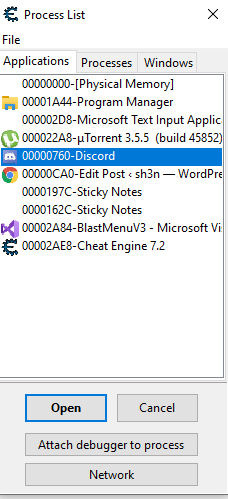
Okay, so first, I will be using Cheat Engine because it has a powerful tool that helps to enumerate dll’s. Second, I will be dissecting discord app as an example.

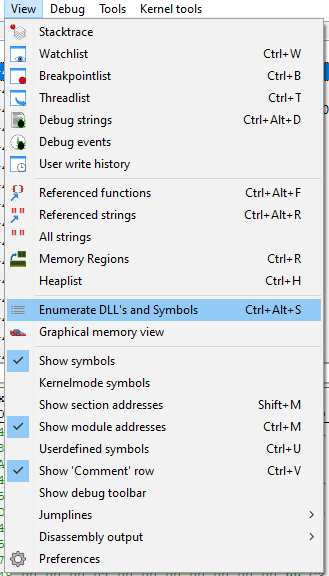
We’ll open up discord.
Enumerate the Dll’s
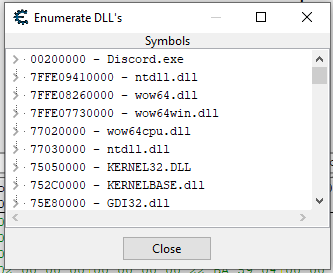
And look at that!

Look at that! Faker what was that?. We have seen two ntdll.dll, wow64.dll, wow64win.dll and wow64cpu.dll. Also, if you noticed, 3 dll’s are in 64bit address space. Remember that we cannot execute 64bit codes directly in 32bit application. So what’s happening?

Answer: WOW64

We’ll follow the traces from 32bit ntdll. Let’s trace the NtVirtualProtectMemory on it.

ZwProtectVirtualMemory in 32bit ntdll

It’s not a surprise that we might not found syscall here. But we’ll follow the call.

ntdll.RtlInterlockedCompareExchange64+170 in 32bit ntdll
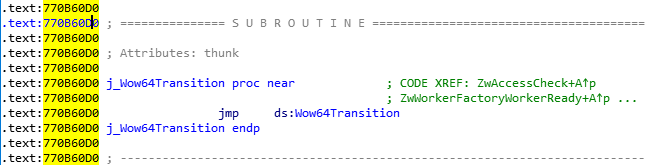
wow64cpu.dll + 7000

Look at that! RAX?!! 64bit code! What is this?

In fact, on 64-bit Windows, the first piece of code to execute in *any* process, is always the 64-bit NTDLL, which takes care of initializing the process in user-mode (as a 64-bit process!). It’s only later that the Windows-on-Windows (WoW64) interface takes over, loads a 32-bit NTDLL, and execution begins in 32-bit mode through a far jump to a compatibility code segment. The 64-bit world is never entered again, except whenever the 32-bit code attempts to issue a system call. The 32-bit NTDLL that was loaded, instead of containing the expected SYSENTER instruction, actually contains a series of instructions to jump back into 64-bit mode, so that the system call can be issued with the SYSCALL instruction, and so that parameters can be sent using the x64 ABI, sign-extending as needed.

In Alex Lonescu’ blog, he said.

So, whenever you are trying to syscall a function on 32bit ntdll, it will then traverse from 32bit ntdll to 64bit ntdll via wow64 layer dll’s.

Finally! The syscall in 64bit ntdll!

To summarize,

32-bit ntdll.dll -> wow64cpu.dll’s Heaven’s Gate -> 64-bit ntdll.dll syscall-> kernel-land

The solution

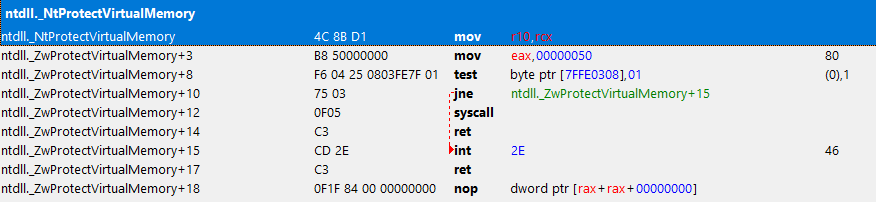
We just need to copy the opcode from ZwProtectVirtualMemory in 32bit ntdll. As I said, it was already hooked so we cannot use it. Meanwhile, we can imitate the original opcodes of it before it was hooked.

template<typename T>
void makesyscall<T>::CreateShellSysCall(byte sysindex1, byte sysindex2, byte sysindex3, byte sysindex4, LPCSTR lpFuncName, DWORD offsetToFunc, byte retCode, byte ret1, byte ret2)
{
	if (!sysindex1 && !sysindex2 && !sysindex3 && !sysindex4)
		return;

#ifdef _WIN64
	byte ShellCode[]
	{
		0x4C, 0x8B, 0xD1,					//mov r10, rcx 
		0xB8, 0x00, 0x00, 0x00, 0x00,		        //mov eax, SysCallIndex
		0x0F, 0x05,					        //syscall
		0xC3								//ret				
	};

	m_pShellCode = (char*)VirtualAlloc(nullptr, sizeof(ShellCode), MEM_RESERVE | MEM_COMMIT, PAGE_EXECUTE_READWRITE);

	if (!m_pShellCode)
		return;

	memcpy(m_pShellCode, ShellCode, sizeof(ShellCode));

	*(byte*)(m_pShellCode + 4) = sysindex1;
	*(byte*)(m_pShellCode + 5) = sysindex2;
	*(byte*)(m_pShellCode + 6) = sysindex3;
	*(byte*)(m_pShellCode + 7) = sysindex4;

#elif _WIN32
	byte ShellCode[]
	{
		0xB8, 0x00, 0x00, 0x00, 0x00,		        //mov eax, SysCallIndex
		0xBA, 0x00, 0x00, 0x00, 0x00,		        //mov edx, [function]
		0xFF, 0xD2,						//call edx
		0xC2, 0x14, 0x00								//ret
	};

	m_pShellCode = (char*)VirtualAlloc(nullptr, sizeof(ShellCode), MEM_RESERVE | MEM_COMMIT, PAGE_EXECUTE_READWRITE);

	if (!m_pShellCode)
		return;

	memcpy(m_pShellCode, ShellCode, sizeof(ShellCode));

	*(uintptr_t*)(m_pShellCode + 6) = (uintptr_t)((DWORD)GetProcAddress(GetModuleHandleA("ntdll.dll"), lpFuncName) + offsetToFunc);

	*(byte*)(m_pShellCode + 1) = sysindex1;
	*(byte*)(m_pShellCode + 2) = sysindex2;
	*(byte*)(m_pShellCode + 3) = sysindex3;
	*(byte*)(m_pShellCode + 4) = sysindex4;

	*(byte*)(m_pShellCode + 12) = retCode;
	*(byte*)(m_pShellCode + 13) = ret1;
	*(byte*)(m_pShellCode + 14) = ret2;
#endif
}
makesyscall<NTSTATUS>(0x50, 0x00, 0x00, 0x00, "RtlInterlockedCompareExchange64", 0x170, 0xC2, 0x14, 0x00)(GetCurrentProcess(), &addr, &size, PAGE_EXECUTE_READ | PAGE_GUARD, &oldProtection)

POC

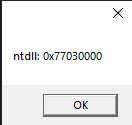
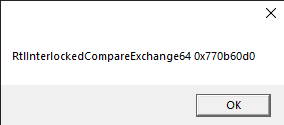
Okay, so here is it. We’ve injected the dll and got some print for debugging.

Printing base ntdll
Printing the location of Rtl…

We dumped the running executable to check the print results. And, hell yeah!

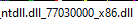
Result of dump
Check the location of Rtl…

We then therefore conclude that we have successfully bypassed basic usermode hook.

Extended usage

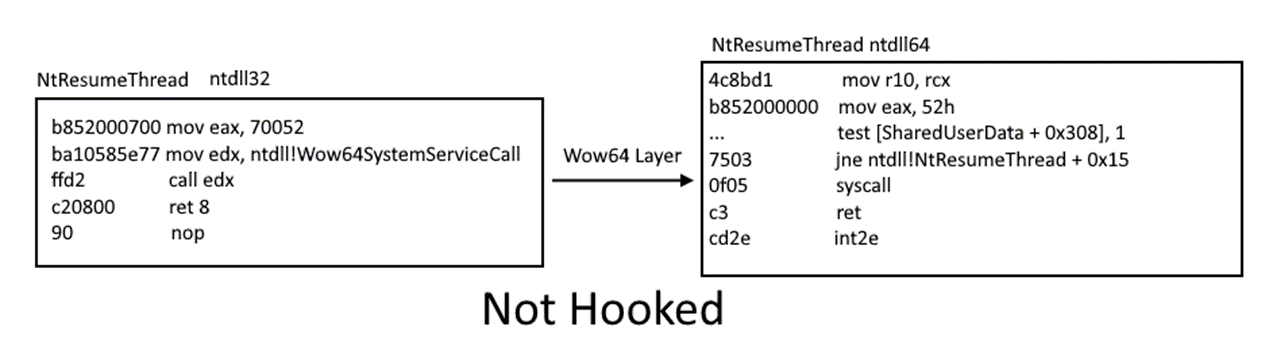
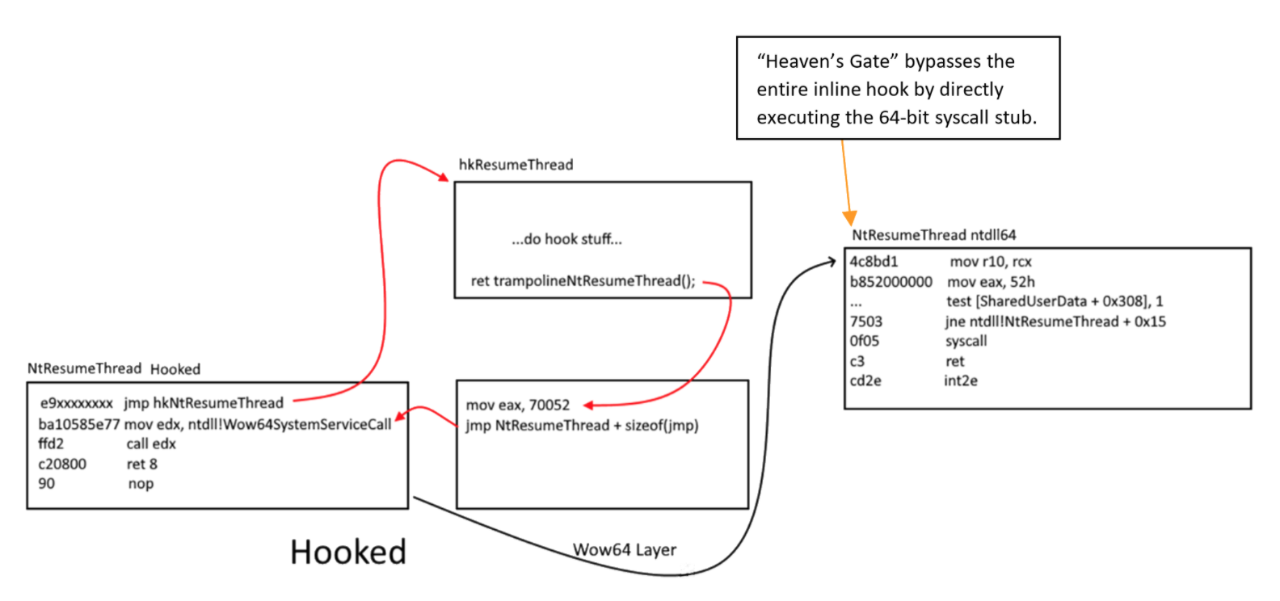
With all this knowledge, we can also implement heaven’s gate hook! All syscalls will then be caught, and have the option to do actions based on the syscalls as your will. But we will not cover this topics as it can be cited from another writeup: WOW64!Hooks: WOW64 Subsystem Internals and Hooking Techniques

Fig 14: https://www.fireeye.com/blog/threat-research/2020/11/wow64-subsystem-internals-and-hooking-techniques.html
NtResumeThread inline hook before transitioning through the WOW64 layer
Fig 15: https://www.fireeye.com/blog/threat-research/2020/11/wow64-subsystem-internals-and-hooking-techniques.html

Conclusion

We therefore conclude that wow64 application are able to execute 64bit syscalls via Heaven’s Gate.
A big thanks to admiralzero@UC for pointing me on the right direction. When I figured out that they hook usermode functions, I feel that was locked out and pushed to do kernel usage, but no, there was a way. And here it is, going through the heaven’s gate!