Abusing Windows Data Executing Privacy (DEP)

Data Execution Prevention (DEP) is a system-level memory protection feature that is built into the operating system starting with Windows XP and Windows Server 2003. DEP enables the system to mark one or more pages of memory as non-executable. Marking memory regions as non-executable means that code cannot be run from that region of memory, which makes it harder for the exploitation of buffer overruns.

DEP prevents code from being run from data pages such as the default heap, stacks, and memory pools. If an application attempts to run code from a data page that is protected, a memory access violation exception occurs, and if the exception is not handled, the calling process is terminated.

DEP is not intended to be a comprehensive defense against all exploits; it is intended to be another tool that you can use to secure your application.

https://docs.microsoft.com/en-us/windows/win32/memory/data-execution-prevention

How Data Execution Prevention Works

If an application attempts to run code from a protected page, the application receives an exception with the status code STATUS_ACCESS_VIOLATION. If your application must run code from a memory page, it must allocate and set the proper virtual memory protection attributes. The allocated memory must be marked PAGE_EXECUTEPAGE_EXECUTE_READPAGE_EXECUTE_READWRITE, or PAGE_EXECUTE_WRITECOPY when allocating memory. Heap allocations made by calling the malloc and HeapAlloc functions are non-executable.

Applications cannot run code from the default process heap or the stack.

DEP is configured at system boot according to the no-execute page protection policy setting in the boot configuration data. An application can get the current policy setting by calling the GetSystemDEPPolicy function. Depending on the policy setting, an application can change the DEP setting for the current process by calling the SetProcessDEPPolicy function.

https://docs.microsoft.com/en-us/windows/win32/api/winnt/ns-winnt-exception_record

EXCEPTION_RECORD

typedef struct _EXCEPTION_RECORD {
  DWORD                    ExceptionCode;
  DWORD                    ExceptionFlags;
  struct _EXCEPTION_RECORD *ExceptionRecord;
  PVOID                    ExceptionAddress;
  DWORD                    NumberParameters;
  ULONG_PTR                ExceptionInformation[EXCEPTION_MAXIMUM_PARAMETERS];
} EXCEPTION_RECORD;

ExceptionInformation

An array of additional arguments that describe the exception. The RaiseException function can specify this array of arguments. For most exception codes, the array elements are undefined. The following table describes the exception codes whose array elements are defined.

Exception codeMeaning
EXCEPTION_ACCESS_VIOLATIONThe first element of the array contains a read-write flag that indicates the type of operation that caused the access violation. If this value is zero, the thread attempted to read the inaccessible data. If this value is 1, the thread attempted to write to an inaccessible address.If this value is 8, the thread causes a user-mode data execution prevention (DEP) violation.
The second array element specifies the virtual address of the inaccessible data.
EXCEPTION_IN_PAGE_ERRORThe first element of the array contains a read-write flag that indicates the type of operation that caused the access violation. If this value is zero, the thread attempted to read the inaccessible data. If this value is 1, the thread attempted to write to an inaccessible address.If this value is 8, the thread causes a user-mode data execution prevention (DEP) violation.
The second array element specifies the virtual address of the inaccessible data.
The third array element specifies the underlying NTSTATUS code that resulted in the exception.
ExceptionInformation table

The abuse!

VirtualProtect(&addr, &size, PAGE_READONLY, &hs.addressToHookOldProtect);

Set the target address into PAGE_READONLY so that if the address tries to execute/write, then it would result to an exception where we can catch the exception using VEH handler.

LONG WINAPI UltimateHooks::LeoHandler(EXCEPTION_POINTERS* pExceptionInfo)
{
	if (pExceptionInfo->ExceptionRecord->ExceptionCode == EXCEPTION_ACCESS_VIOLATION)
	{
		for (HookEntries hs : hookEntries)
		{
			if ((hs.addressToHook == pExceptionInfo->ContextRecord->XIP) &&
				(pExceptionInfo->ExceptionRecord->ExceptionInformation[0] == 8)) {
				//do your dark rituals here
			}
			return EXCEPTION_CONTINUE_EXECUTION;
		}

	}
	return EXCEPTION_CONTINUE_SEARCH;
}

As you can see, you just have to compare the ExceptionInformation[0] if it is 8 to verify if the exception is caused by DEP.

Simple AF!

What can I do with this?

Change the execution flow, modify the stack, modify values, mutate, and anything your imagination can think of! Just use your creativity!

POC
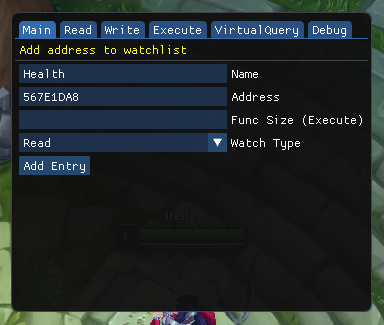
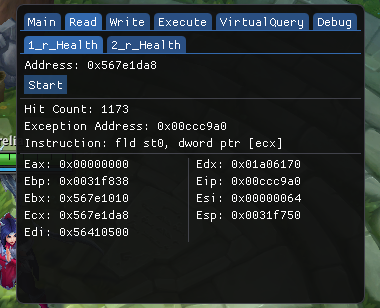
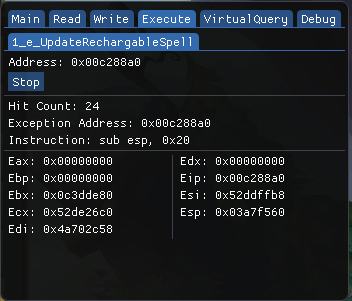
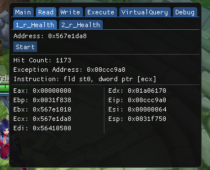
VEH Debugger
VEH Debugger
VEH Debugger via DEP

Conclusion

Thanks for viewing this, I hope you enjoyed this small writeup. Its been a while since I posted writeups, and may post again on some quite time. I am now currently shifting to Linux environment, should you expect that I will be having writeups on Linux, Web, Network, and Pentesting!

I am also planning to get some certifications such as CEH and OSCP, but I am not quite sure yet. But who knows? Ill just update it here whenever I came to a finalization.

Thanks and have a good day!~
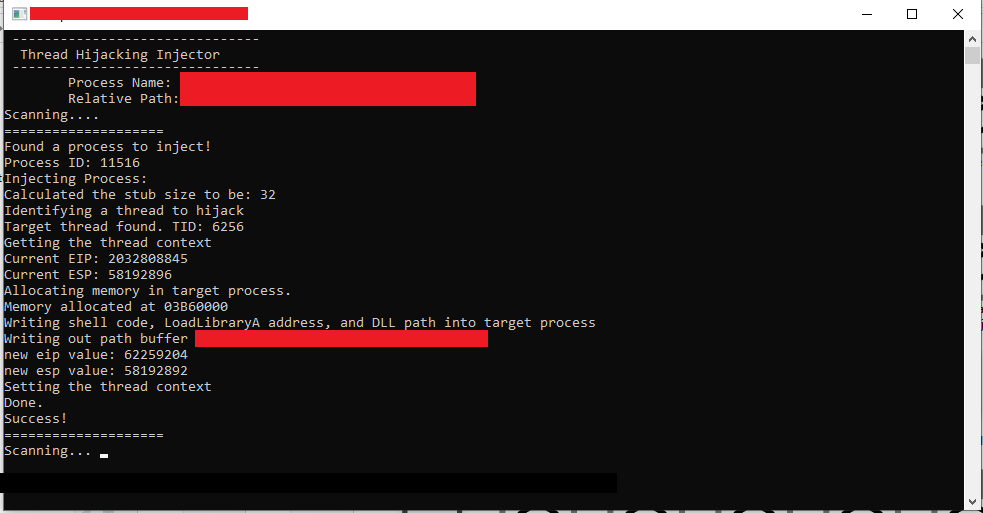
DLL Injection via Thread Hijacking

Okay, so here is a small snippet that you can use for injecting a DLL on an application via “Thread Hijacking”. It’s much safer than injecting with common methods such as CreateRemoteThread. This uses GetThreadContext and SetThreadContext to poison the registers to execute our stub that is allocated via VirtualAllocEx which contains a code that will execute LoadLibraryA that will load our DLL. But this snippet alone is not enough to make your dll injection safe, you can do cleaning of your traces upon injection and other methods. Thanks to thelastpenguin for this awesome base.

FULL CODE

#include <fstream>
#include <iostream>
#include <stdio.h>
#include <Windows.h>
#include <TlHelp32.h>
#include <direct.h> // _getcwd
#include <string>
#include <iomanip>
#include <sstream>
#include <process.h>

#include <unordered_set>

#include "makesyscall.h"
#pragma comment(lib,"ntdll.lib")


using namespace std;

DWORD FindProcessId(const std::wstring&);
long InjectProcess(DWORD, const char*);

void dotdotdot(int count, int delay = 250);
void cls();

int main_scanner();
int main_injector();

string GetExeFileName();
string GetExePath();

BOOL IsAppRunningAsAdminMode();
void ElevateApplication();

__declspec(naked) void stub()
{
	__asm
	{
		// Save registers

		pushad
			pushfd
			call start // Get the delta offset

		start :
		pop ecx
			sub ecx, 7

			lea eax, [ecx + 32] // 32 = Code length + 11 int3 + 1
			push eax
			call dword ptr[ecx - 4] // LoadLibraryA address is stored before the shellcode

			// Restore registers

			popfd
			popad
			ret

			// 11 int3 instructions here
	}
}

// this way we can difference the addresses of the instructions in memory
DWORD WINAPI stub_end()
{
	return 0;
}
//

int main(int argc, char* argv) {
	main_injector();
	main_scanner();
}

BOOL IsAppRunningAsAdminMode()
{
	BOOL fIsRunAsAdmin = FALSE;
	DWORD dwError = ERROR_SUCCESS;
	PSID pAdministratorsGroup = NULL;

	// Allocate and initialize a SID of the administrators group.
	SID_IDENTIFIER_AUTHORITY NtAuthority = SECURITY_NT_AUTHORITY;
	if (!AllocateAndInitializeSid(
		&NtAuthority,
		2,
		SECURITY_BUILTIN_DOMAIN_RID,
		DOMAIN_ALIAS_RID_ADMINS,
		0, 0, 0, 0, 0, 0,
		&pAdministratorsGroup))
	{
		dwError = GetLastError();
		goto Cleanup;
	}

	// Determine whether the SID of administrators group is enabled in 
	// the primary access token of the process.
	if (!CheckTokenMembership(NULL, pAdministratorsGroup, &fIsRunAsAdmin))
	{
		dwError = GetLastError();
		goto Cleanup;
	}

Cleanup:
	// Centralized cleanup for all allocated resources.
	if (pAdministratorsGroup)
	{
		FreeSid(pAdministratorsGroup);
		pAdministratorsGroup = NULL;
	}

	// Throw the error if something failed in the function.
	if (ERROR_SUCCESS != dwError)
	{
		throw dwError;
	}

	return fIsRunAsAdmin;
}
// 

void ElevateApplication(){
	wchar_t szPath[MAX_PATH];
	if (GetModuleFileName(NULL, szPath, ARRAYSIZE(szPath)))
	{
		// Launch itself as admin
		SHELLEXECUTEINFO sei = { sizeof(sei) };
		sei.lpVerb = L"runas";
		sei.lpFile = szPath;
		sei.hwnd = NULL;
		sei.nShow = SW_NORMAL;
		if (!ShellExecuteEx(&sei))
		{
			DWORD dwError = GetLastError();
			if (dwError == ERROR_CANCELLED)
			{
				// The user refused to allow privileges elevation.
				std::cout << "User did not allow elevation" << std::endl;
			}
		}
		else
		{
			_exit(1);  // Quit itself
		}
	}
}

string GetExeFileName()
{
	char buffer[MAX_PATH];
	GetModuleFileNameA(NULL, buffer, MAX_PATH);
	return std::string(buffer);
}

string GetExePath()
{
	std::string f = GetExeFileName();
	return f.substr(0, f.find_last_of("\\/"));
}

int main_scanner() {
	std::cout << "Loading";
	dotdotdot(4);
	std::cout << endl;

	cls();

	string processName = "Game.exe";
	string payloadPath = GetExePath() + "\\" + "hack.dll";

	cls();
	std::cout << "\tProcess Name: " << processName << endl;
	std::cout << "\tRelative Path: " << payloadPath << endl;

	std::wstring fatProcessName(processName.begin(), processName.end());
	
	std::unordered_set<DWORD> injectedProcesses;


	while (true) {
		std::cout << "Scanning";
		while (true) {
			dotdotdot(4);

			DWORD processId = FindProcessId(fatProcessName);
			if (processId && injectedProcesses.find(processId) == injectedProcesses.end()) {
				std::cout << "\n====================\n";
				std::cout << "Found a process to inject!" << endl;
				std::cout << "Process ID: " << processId << endl;
				std::cout << "Injecting Process: " << endl;

				if (InjectProcess(processId, payloadPath.c_str()) == 0) {
					std::cout << "Success!" << endl;
					injectedProcesses.insert(processId);
				}
				else {
					std::cout << "Error!" << endl;
				}
				std::cout << "====================\n";
				break;
			}
		}
	}
}

int main_injector() {
	cls();

	if (IsAppRunningAsAdminMode())
		return 1;
	else
		ElevateApplication();
}

void dotdotdot(int count, int delay) {
	int width = count;
	for (int dots = 0; dots <= count; ++dots) {
		std::cout << std::left << std::setw(width) << std::string(dots, '.');
		Sleep(delay);
		std::cout << std::string(width, '\b');
	}
}

void cls() {
	std::system("cls");
	std::cout <<
		" -------------------------------\n"
		"  Thread Hijacking Injector \n"

		" -------------------------------\n";
}

DWORD FindProcessId(const std::wstring& processName) {
	PROCESSENTRY32 processInfo;
	processInfo.dwSize = sizeof(processInfo);

	HANDLE processesSnapshot = CreateToolhelp32Snapshot(TH32CS_SNAPPROCESS, NULL);
	if (processesSnapshot == INVALID_HANDLE_VALUE)
		return 0;

	Process32First(processesSnapshot, &processInfo);
	if (!processName.compare(processInfo.szExeFile))
	{
		CloseHandle(processesSnapshot);
		return processInfo.th32ProcessID;
	}

	while (Process32Next(processesSnapshot, &processInfo))
	{
		if (!processName.compare(processInfo.szExeFile))
		{
			CloseHandle(processesSnapshot);
			return processInfo.th32ProcessID;
		}
	}

	CloseHandle(processesSnapshot);
	return 0;
}


long InjectProcess(DWORD ProcessId, const char* dllPath) {

	HANDLE hProcess, hThread, hSnap;
	DWORD stublen;
	PVOID LoadLibraryA_Addr, mem;

	THREADENTRY32 te32;
	CONTEXT ctx;

	// determine the size of the stub that we will insert
	stublen = (DWORD)stub_end - (DWORD)stub;
	cout << "Calculated the stub size to be: " << stublen << endl;


	// opening target process
	hProcess = OpenProcess(PROCESS_ALL_ACCESS, FALSE, ProcessId);

	if (!hProcess) {
		cout << "Failed to load hProcess with id " << ProcessId << endl;
		Sleep(10000);
		return 0;
	}

	// todo: identify purpose of this code
	te32.dwSize = sizeof(te32);
	hSnap = CreateToolhelp32Snapshot(TH32CS_SNAPTHREAD, 0);


	Thread32First(hSnap, &te32);
	cout << "Identifying a thread to hijack" << endl;
	while (Thread32Next(hSnap, &te32))
	{
		if (te32.th32OwnerProcessID == ProcessId)
		{
			cout << "Target thread found. TID: " << te32.th32ThreadID << endl;

			CloseHandle(hSnap);
			break;
		}
	}

	// opening a handle to the thread that we will be hijacking
	hThread = OpenThread(THREAD_ALL_ACCESS, false, te32.th32ThreadID);
	if (!hThread) {
		cout << "Failed to open a handle to the thread " << te32.th32ThreadID << endl;
		Sleep(10000);
		return 0;
	}

	// now we suspend it.
	ctx.ContextFlags = CONTEXT_FULL;
	SuspendThread(hThread);

	cout << "Getting the thread context" << endl;
	if (!GetThreadContext(hThread, &ctx)) // Get the thread context
	{
		cout << "Unable to get the thread context of the target thread " << GetLastError() << endl;
		ResumeThread(hThread);
		Sleep(10000);
		return -1;
	}

	cout << "Current EIP: " << ctx.Eip << endl;
	cout << "Current ESP: " << ctx.Esp << endl;

	cout << "Allocating memory in target process." << endl;
	mem = VirtualAllocEx(hProcess, NULL, 4096, MEM_COMMIT | MEM_RESERVE, PAGE_EXECUTE_READWRITE);

	if (!mem) {
		cout << "Unable to reserve memory in the target process." << endl;
		ResumeThread(hThread);
		Sleep(10000);
		return -1;
	}

	cout << "Memory allocated at " << mem << endl;
	LoadLibraryA_Addr = LoadLibraryA;

	cout << "Writing shell code, LoadLibraryA address, and DLL path into target process" << endl;

	cout << "Writing out path buffer " << dllPath << endl;
	size_t dllPathLen = strlen(dllPath);

	WriteProcessMemory(hProcess, mem, &LoadLibraryA_Addr, sizeof(PVOID), NULL); // Write the address of LoadLibraryA into target process
	WriteProcessMemory(hProcess, (PVOID)((LPBYTE)mem + 4), stub, stublen, NULL); // Write the shellcode into target process
	WriteProcessMemory(hProcess, (PVOID)((LPBYTE)mem + 4 + stublen), dllPath, dllPathLen, NULL); // Write the DLL path into target process

	ctx.Esp -= 4; // Decrement esp to simulate a push instruction. Without this the target process will crash when the shellcode returns!
	WriteProcessMemory(hProcess, (PVOID)ctx.Esp, &ctx.Eip, sizeof(PVOID), NULL); // Write orginal eip into target thread's stack
	ctx.Eip = (DWORD)((LPBYTE)mem + 4); // Set eip to the injected shellcode

	cout << "new eip value: " << ctx.Eip << endl;
	cout << "new esp value: " << ctx.Esp << endl;

	cout << "Setting the thread context " << endl;

	if (!SetThreadContext(hThread, &ctx)) // Hijack the thread
	{
		cout << "Unable to SetThreadContext" << endl;
		VirtualFreeEx(hProcess, mem, 0, MEM_RELEASE);
		ResumeThread(hThread);
		Sleep(10000);
		return -1;
	}

	ResumeThread(hThread);

	cout << "Done." << endl;

	return 0;
}

PoC

Thread Hijacking PoC

I think that’s all for this writeup. With that being said, this could be my last writeup for now as I am going very very busy for the next couple of months.

Thank you so much, and I hope you enjoyed this writeup!

root@sh3n:~/$ see_ya_again_soon_!

Walking through VEH handlers list

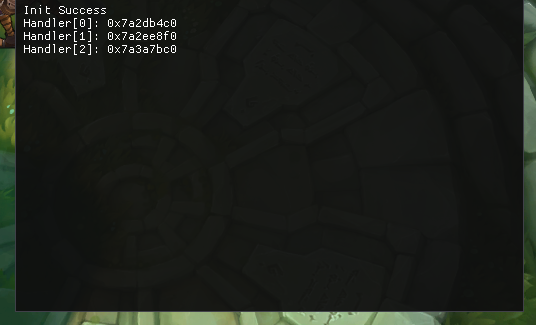
This writeup is just a PoC on getting the handlers list in win10.
This PoC was done in Win10 build 19041.

VEH is used to catch exceptions happening in the application, when the exceptions are caught, you have a chance to resolve the exceptions to avoid application crash.

Credits

Almost this whole writeup is written by Dimitri Fourny and not my original writeup but some parts of it are modified as per my Win10 build version. Please kindly visit his blog to see the original writeup.

VEH usage example

LONG NTAPI MyVEHHandler(PEXCEPTION_POINTERS ExceptionInfo) {
  printf("MyVEHHandler (0x%x)\n", ExceptionInfo->ExceptionRecord->ExceptionCode);

  if (ExceptionInfo->ExceptionRecord->ExceptionCode == EXCEPTION_INT_DIVIDE_BY_ZERO) {
    printf("  Divide by zero at 0x%p\n", ExceptionInfo->ExceptionRecord->ExceptionAddress);
    ExceptionInfo->ContextRecord->Eip += 2;
    return EXCEPTION_CONTINUE_EXECUTION;
  }

  return EXCEPTION_CONTINUE_SEARCH;
}

int main() {
  AddVectoredExceptionHandler(1, MyVEHHandler);
  int except = 5;
  except /= 0;
  return 0;
}

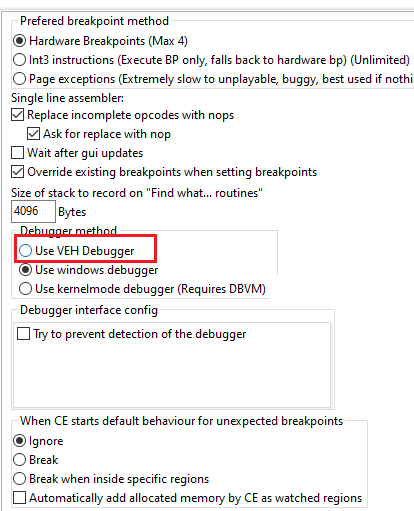
There are also applications that uses this method to other matters, such as Cheat Engine to bypass basic debugger checks.

Cheat Engine VEH Debugger

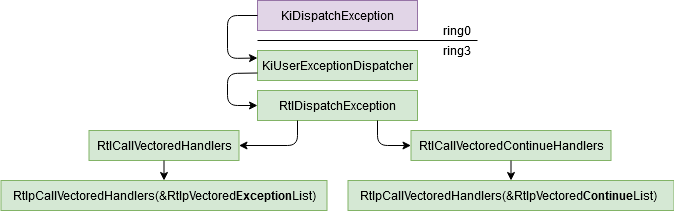
Exception Path

When a CPU exception occurs, the kernel will call the function KiDispatchException (ring0) which will follow this exception to the ntdll method KiUserExceptionDispatcher (ring3). This function will call RtlDispatchException which will try to handle it via the VEH. To do it, it will read the VEH chained list via RtlCallVectoredHandlers and calling each handlers until one return EXCEPTION_CONTINUE_EXECUTION. If a handler returned EXCEPTION_CONTINUE_EXECUTION, the function RtlCallVectoredContinueHandlers is called and it will call all the continue exception handlers.

Exception Path

The VEH handlers are important because the SEH handlers are called only if no VEH handler has caught the exception, so it could be the best method to catch all exceptions if you don’t want to hook KiUserExceptionDispatcher. If you want more information about the exceptions dispatcher, 0vercl0ck has made a good paper about it.

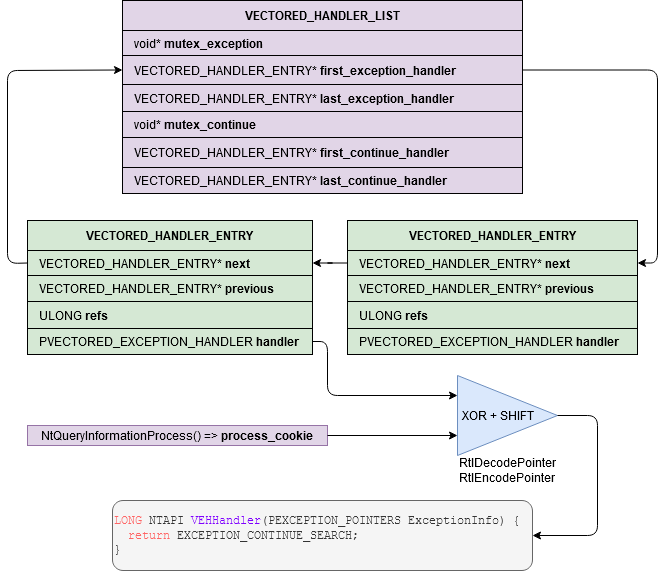
The chained list

The VEH list is a circular linked list with the handlers functions pointers encoded:

Chained List

The exception handlers are encoded with a process cookie but you can decode them easily. If you are dumping the VEH which is inside your own process, you can just use DecodePointer and you don’t have to care about the process cookie. If it’s a remote process you can use DecodeRemotePointer but you will need to create your own function pointer with GetModuleHandle("kernel32.dll") and GetProcAddress("DecodeRemotePointer").

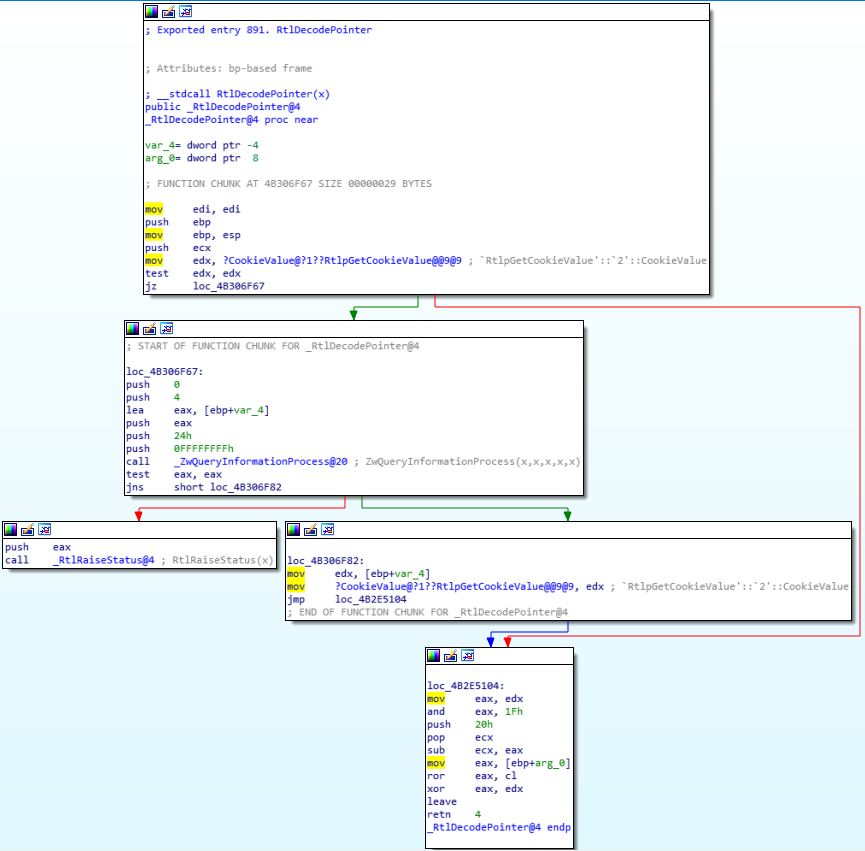
The solution that I have chosen is to imitate DecodePointer by getting the process cookie with ZwQueryProcessInformation and applying the same algorithm:

RtlDecodePointer
DWORD Process::GetProcessCookie() const {
  DWORD cookie = 0;
  DWORD return_length = 0;

  HMODULE ntdll = GetModuleHandleA("ntdll.dll");
  _NtQueryInformationProcess NtQueryInformationProcess =
      reinterpret_cast<_NtQueryInformationProcess>(
          GetProcAddress(ntdll, "NtQueryInformationProcess"));

  NTSTATUS success = NtQueryInformationProcess(
      process_handle_, ProcessCookie, &cookie, sizeof(cookie), &return_length);
  if (success < 0) {
    return 0;
  }
  return cookie;
}

#define ROR(x, y) ((unsigned)(x) >> (y) | (unsigned)(x) << 32 - (y))
DWORD Process::DecodePointer(DWORD pointer) {
  if (!process_cookie_) {
    process_cookie_ = GetProcessCookie();
    if (!process_cookie_) {
      return 0;
    }
  }

  unsigned char shift_size = 0x20 - (process_cookie_ & 0x1f);
  return ROR(pointer, shift_size) ^ process_cookie_;
}

Finding the VEH list offset

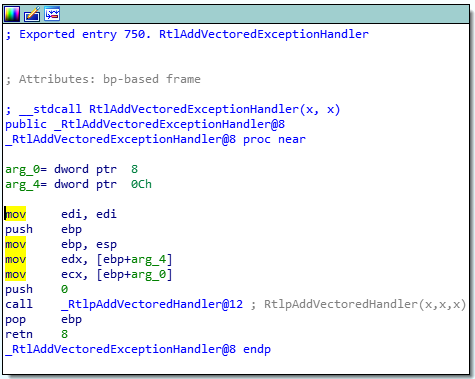
Even if you can find the symbol LdrpVectorHandlerList in the ntdll pdb, there is no official API to get it easily. My solution is to begin by getting a pointer to RtlpAddVectoredHandler:

RtlAddVectoredExceptionHandler

You can disassemble the method RtlAddVectoredExceptionHandler until you find the instruction call or you can just pretend that its address is always at 0x16 bytes after it:

BYTE* add_exception_handler = reinterpret_cast<BYTE*>(
    GetProcAddress(ntdll, "RtlAddVectoredExceptionHandler"));
BYTE* add_exception_handler_sub =
    add_exception_handler + 0x16;  // RtlpAddVectoredHandler

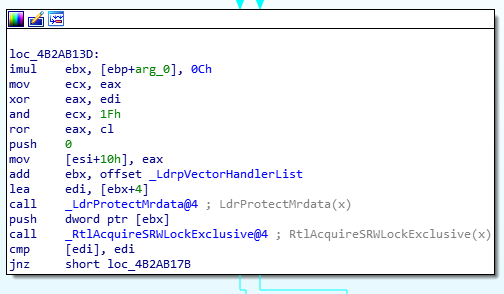
And from here the same byte offset method could work, but a simple signature system could prevent us to be broken after a small Windows update:

_LdrpVectorHandlerList
const BYTE pattern_list[] = {
    0x89, 0x46, 0x10,          // mov [esi+10h], eax
    0x81, 0xc3, 0, 0, 0, 0  // add ebx, offset LdrpVectorHandlerList
};
const char mask_list[] = "xxxxx????";
BYTE* match_list =
    SearchPattern(add_exception_handler_sub, 0x100, pattern_list, mask_list);
BYTE* veh_list = *reinterpret_cast<BYTE**>(match_list + 5);
size_t veh_list_offset = veh_list - reinterpret_cast<BYTE*>(ntdll);
printf("LdrpVectorHandlerList: 0x%p (ntdll+0x%x)\n", veh_list, veh_list_offset);

Final code

#define ROR(x, y) ((unsigned)(x) >> (y) | (unsigned)(x) << 32 - (y))

DWORD Process::GetProcessCookie() const {
  DWORD cookie = 0;
  DWORD return_length = 0;

  HMODULE ntdll = GetModuleHandleA("ntdll.dll");
  _NtQueryInformationProcess NtQueryInformationProcess =
      reinterpret_cast<_NtQueryInformationProcess>(
          GetProcAddress(ntdll, "NtQueryInformationProcess"));

  NTSTATUS success = NtQueryInformationProcess(
      process_handle_, ProcessCookie, &cookie, sizeof(cookie), &return_length);
  if (success < 0) {
    return 0;
  }
  return cookie;
}

DWORD Process::DecodePointer(DWORD pointer) {
  if (!process_cookie_) {
    process_cookie_ = GetProcessCookie();
    if (!process_cookie_) {
      return 0;
    }
  }

  unsigned char shift_size = 0x20 - (process_cookie_ & 0x1f);
  return ROR(pointer, shift_size) ^ process_cookie_;
}

typedef struct _VECTORED_HANDLER_ENTRY {
  _VECTORED_HANDLER_ENTRY* next;
  _VECTORED_HANDLER_ENTRY* previous;
  ULONG refs;
  PVECTORED_EXCEPTION_HANDLER handler;
} VECTORED_HANDLER_ENTRY;

typedef struct _VECTORED_HANDLER_LIST {
  void* mutex_exception;
  VECTORED_HANDLER_ENTRY* first_exception_handler;
  VECTORED_HANDLER_ENTRY* last_exception_handler;
  void* mutex_continue;
  VECTORED_HANDLER_ENTRY* first_continue_handler;
  VECTORED_HANDLER_ENTRY* last_continue_handler;
} VECTORED_HANDLER_LIST;

DWORD GetVEHOffset() {
  HMODULE ntdll = LoadLibraryA("ntdll.dll");
  printf("ntdll: 0x%p\n", ntdll);
  perror_if_invalid(ntdll, "LoadLibrary");

  BYTE* add_exception_handler = reinterpret_cast<BYTE*>(
      GetProcAddress(ntdll, "RtlAddVectoredExceptionHandler"));
  printf("RtlAddVectoredExceptionHandler: 0x%p\n", add_exception_handler);
  perror_if_invalid(add_exception_handler, "GetProcAddress");

  BYTE* add_exception_handler_sub = add_exception_handler + 0x16;
  printf("RtlpAddVectoredExceptionHandler: 0x%p\n", add_exception_handler_sub);

  const BYTE pattern_list[] = {
      0x89, 0x46, 0x10,          // mov [esi+10h], eax
      0x81, 0xc3, 0,    0, 0, 0  // add ebx, offset LdrpVectorHandlerList
  };
  const char mask_list[] = "xxxxx????";
  BYTE* match_list =
      SearchPattern(add_exception_handler_sub, 0x100, pattern_list, mask_list);
  perror_if_invalid(match_list, "SearchPattern");
  BYTE* veh_list = *reinterpret_cast<BYTE**>(match_list + 5);
  size_t veh_list_offset = veh_list - reinterpret_cast<BYTE*>(ntdll);
  printf("LdrpVectorHandlerList: 0x%p (ntdll+0x%x)\n", veh_list,
         veh_list_offset);

  return veh_list_offset;
}

int main() {
  auto process = Process::GetProcessByName(L"veh_dumper.exe");
  perror_if_invalid(process.get(), "GetProcessByName");
  printf("Process cookie: 0x%0x\n", process->GetProcessCookie());

  DWORD ntdll = process->GetModuleBase(L"ntdll.dll");
  VECTORED_HANDLER_LIST handler_list;
  DWORD veh_addr = ntdll + GetVEHOffset();
  printf("VEH: 0x%08x\n", veh_addr);
  process->ReadProcMem(veh_addr, &handler_list, sizeof(handler_list));
  printf("First entry: 0x%p\n", handler_list.first_exception_handler);
  printf("Last entry: 0x%p\n", handler_list.last_exception_handler);

  if (reinterpret_cast<DWORD>(handler_list.first_exception_handler) ==
      veh_addr + sizeof(DWORD)) {
    printf("VEH list is empty\n");
    return 0;
  }

  printf("Dumping the entries:\n");
  VECTORED_HANDLER_ENTRY entry;
  process->ReadProcMem(
      reinterpret_cast<DWORD>(handler_list.first_exception_handler), &entry,
      sizeof(entry));
  while (true) {
    DWORD handler = reinterpret_cast<DWORD>(entry.handler);
    printf("  handler = 0x%p => 0x%p\n", handler,
           process->DecodePointer(handler));

    if (reinterpret_cast<DWORD>(entry.next) == veh_addr + sizeof(DWORD)) {
      break;
    }
    process->ReadProcMem(reinterpret_cast<DWORD>(entry.next), &entry,
                         sizeof(entry));
  }
}

POC

Game that uses VEH

With this, I can now walk through VEH and reverse what does the handlers do.
Again, this is not my original writeup, all credits goes to Dimitri Fourny.

Thank you for reading! I hope you’ve enjoyed 🙂

Hooking via Vectored Exception Handling

In computer programming, the term hooking covers a range of techniques used to alter or augment the behaviour of an operating system, of applications, or of other software components by intercepting function calls or messages or events passed between software components. Code that handles such intercepted function calls, events or messages is called a hook.

Hooking is used for many purposes, including debugging and extending functionality. Examples might include intercepting keyboard or mouse event messages before they reach an application, or intercepting operating system calls in order to monitor behavior or modify the function of an application or other component. It is also widely used in benchmarking programs, for example frame rate measuring in 3D games, where the output and input is done through hooking.

Hooking can also be used by malicious code. For example, rootkits, pieces of software that try to make themselves invisible by faking the output of API calls that would otherwise reveal their existence, often use hooking techniques.

https://en.wikipedia.org/wiki/Hooking

Hooking Methods

The content of this section came from UC and is not my own words. Kindly visit the page for more detailed and complete info.

Byte patching (.text section)

Execute-Speed: 10
Skill-Level: 2
Detectionrate: 5 – 7

Byte patching in the .text section is the easiest and most common way to place a hook.
Hooking libraries like Microsoft Detours (Download) are used alot.
Some anticheats are still retarded and dont even scan the .text section, but most of them figured out that one finally.
There are various ways to redirect the code flow. You can place a normal JMP instruction (5 bytes in size) or try some hotpatching using a short JMP (2 bytes in size) to some location where is more space for a 5 byte JMP.
You can place a CALL instruction which works same as a JMP but pushes the returnaddress on the stack before jumping. You can also just push the address on the stack and then call RETN which jumps to the last adddress on stack and therefore behaves like a JMP.
Most anticheats figured that out and scan for those byte sequences.

IAT/EAT Hooking

Execute-Speed: 10
Skill-Level: 3
Detectionrate: 5

This hooking method is based on how the PE files are working on windows.
It means “Import/Export Address Table”. This address table contains the pointer to the APIs and is adjusted by the PE loader when the file is executed.
You can either loop the whole table and search for a function and redirect it or you can find it manually using OllyDbg or IDA.
The basic idea is that you replace a certain API with your hooked function.
Thats not only good for simple API hooking but it can also be used for a DirectX hook: http://www.unknowncheats.me/forum/d3…ok-any-os.html

VMT Hooking / Pointer redirections

Execute-Speed: 10
Skill-Level: 3 – 5
Detectionrate: 3

One of the best hooking methods because there is no API or basic way to detect those hooks.
Most anticheats detect VMT hooks on the D3D-Device of the engine but thats not what we want to do anyways.
Nearly every engine has an internal rendering class which can be hooked. You can for example just hook Endscene using detours and log the returnaddress.
When you check the code at the returnaddress you will find the function which calls Endscene. Now search for references to this function and reverse a bit, you will mostlikely get a pointer in the .data section which represents a virtual table.
Those tables just contain addresses of functions and can be easily replaced even without the usage of VirtualProtect because .data has normally Read/Write flags.

HWBP Hooking

Execute-Speed: 6
Skill-Level: 6
Detectionrate: 4

We already talked earlier about hardware breakpoints but this time we wont change any bytes in the .text section.
Like I said earlier you also have to place an exception handler to catch the exception!
They can be placed for each thread individually but that also means we NEED the handle of the thread.
Some anticheats hide all threads using rootkit techniques, but that doesnt mean we cant get into the thread!

PageGuard Hooking

Execute-Speed: 1
Skill-Level: 8
Detectionrate: 1

PageGuard hooks are really stealthy, nearly no AntiCheat detects them. This was detected for GameGuard but only in the game, it worked perfectly on the GameGuard file itself.
Undetected for HackShield, XignCode, Punkbuster, and more. This method can be compared to a HWBP hook. First you have to register an exception handler.
Then you have to trigger the exception, this time by marking the complete memory page with PAGE_GUARD using VirtualProtect, which will result in an exception.
When you read about PAGE_GUARD on msdn you will find out that its removed automaticly after the first exception occured.
In our exception handler we now set the single step flag and single step all instructions until we hit the address we looked for.
We can change the EIP again like we did earlier, but now we have to mark the page as PAGE_GUARD again otherwise the hook wont be triggered again!
This hooking method is slow as hell due to the usage of the single step flag and should only be used for functions which get called very rarely.

Forced Exception hooking

Execute-Speed: 5
Skill-Level: 8
Detectionrate: 2

You can force exceptions in a program by manipulating pointers and stored values.
For example you can grab the device pointer of a game and set it to null, then wait in your exception handler until the program throws an exception.
The exception itself should be a null-pointer dereference, just do your stuff in the redirected EIP hook and then reset the original values and continue the execution.
Since the pointer is now fine again it will execute until you set the pointer to null again. There are many more ways to use this but since I used that method before I know this works forreal.
You might need alot of work to fix all the exceptions which requires some skills.
Heres an example on forcing an exception: http://www.unknowncheats.me/forum/c-…struction.html

VEH Hooking (Let’s get our hands dirty!)

But why VEH? It’s slow AF. Yes it’s slow but I would not take risk byte-patching because it is prone for integrity check which may result to your account being banned. Also, other methods are not applicable such as IAT and VMT. And my last resort is VEH hooking.

Well, your choice will be dependent to situation, every methods has pros and cons. Its up to you on how you would utilize the information.

Implementation

Implementation is quite easy! Thanks to many samples out there!

LONG WINAPI Handler(EXCEPTION_POINTERS* pExceptionInfo)
{
	
	if (pExceptionInfo->ExceptionRecord->ExceptionCode == STATUS_GUARD_PAGE_VIOLATION) //We will catch PAGE_GUARD Violation
	{
		if (pExceptionInfo->ContextRecord->XIP == (DWORD)og_fun) //Make sure we are at the address we want within the page
		{
			pExceptionInfo->ContextRecord->XIP = (DWORD)hk_fun; //Modify EIP/RIP to where we want to jump to instead of the original function
		}

		pExceptionInfo->ContextRecord->EFlags |= 0x100; //Will trigger an STATUS_SINGLE_STEP exception right after the next instruction get executed. In short, we come right back into this exception handler 1 instruction later
		return EXCEPTION_CONTINUE_EXECUTION; //Continue to next instruction
	}

	if (pExceptionInfo->ExceptionRecord->ExceptionCode == STATUS_SINGLE_STEP) //We will also catch STATUS_SINGLE_STEP, meaning we just had a PAGE_GUARD violation
	{
		//uint32_t dwOld;
		//dwOld = Controller->VirtualProtect((DWORD)og_fun, 1, PAGE_EXECUTE_READ | PAGE_GUARD); //Reapply the PAGE_GUARD flag because everytime it is triggered, it get removes

		DWORD dwOld;
		auto addr = (PVOID)og_fun;
		auto size = (SIZE_T)((int)1);
		NTSTATUS res = makesyscall<NTSTATUS>(0x50, 0x00, 0x00, 0x00, "RtlInterlockedCompareExchange64", 0x170, 0xC2, 0x14, 0x00)(GetCurrentProcess(), &addr, &size, PAGE_EXECUTE_READ | PAGE_GUARD, &dwOld);

		return EXCEPTION_CONTINUE_EXECUTION; //Continue the next instruction
	}

	return EXCEPTION_CONTINUE_SEARCH; //Keep going down the exception handling list to find the right handler IF it is not PAGE_GUARD nor SINGLE_STEP
}
bool AreInSamePage(const DWORD* Addr1, const DWORD* Addr2)
{
	MEMORY_BASIC_INFORMATION mbi1;
	if (!VirtualQuery(Addr1, &mbi1, sizeof(mbi1))) //Get Page information for Addr1
		return true;

	MEMORY_BASIC_INFORMATION mbi2;
	if (!VirtualQuery(Addr2, &mbi2, sizeof(mbi2))) //Get Page information for Addr1
		return true;

	if (mbi1.BaseAddress == mbi2.BaseAddress) //See if the two pages start at the same Base Address
		return true; //Both addresses are in the same page, abort hooking!

	return false;
}
bool Hook(DWORD original_fun, DWORD hooked_fun)
{
	og_fun = original_fun;
	hk_fun = hooked_fun;

	//We cannot hook two functions in the same page, because we will cause an infinite callback
	if (AreInSamePage((const DWORD*)og_fun, (const DWORD*)hk_fun))
		return false;

	//Register the Custom Exception Handler
	VEH_Handle = AddVectoredExceptionHandler(true, (PVECTORED_EXCEPTION_HANDLER)LeoHandler);

	//Toggle PAGE_GUARD flag on the page
	if (VEH_Handle) {
		auto addr = (PVOID)og_fun;
		auto size = (SIZE_T)((int)1);

		if (NT_SUCCESS(makesyscall<NTSTATUS>(0x50, 0x00, 0x00, 0x00, "RtlInterlockedCompareExchange64", 0x170, 0xC2, 0x14, 0x00)(GetCurrentProcess(), &addr, &size, PAGE_EXECUTE_READ | PAGE_GUARD, &oldProtection))) {
			return true;
		}

	}
	return false;
}

POC

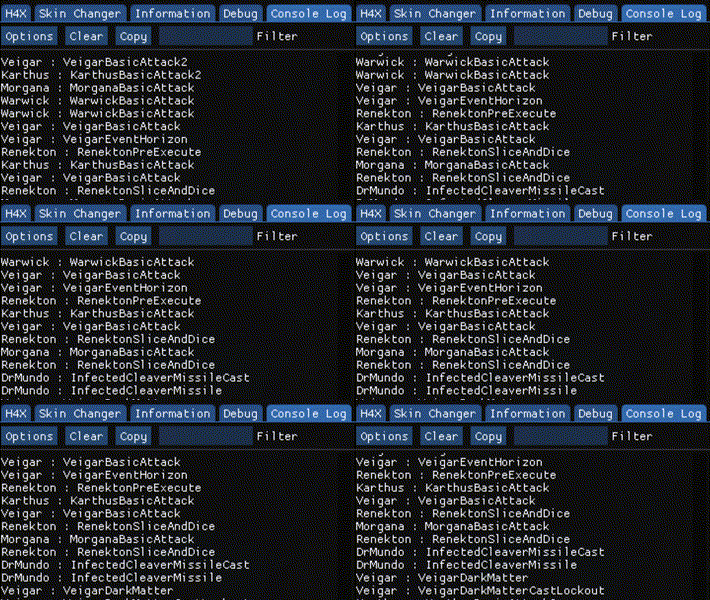
I hooked a function in a game that is executed every character’s action.

Conclusion

VEH is quite simple to implement, but again, it might depend on the situation you are working on. Besides, you will feel the impact on decreased performance because this is quite slow unlike other methods.

Thank you so much for reading this. I hope you enjoyed this writeup!

Through the Heaven’s Gate

Really, the title does not literary means it. This writeup is about a research but not mine. And you will see why this writeup is called “Through the Heaven’s Gate” later on.

Background

My interest in this topic started from reversing a game. This game hooks many userland functions including the ones I’m interested in, VirtualProtect and NtVirtualProtectMemory. Without this, I am unable to change protection on pages and such.

This pushes me to resolve my need via kernel driver. I map my own kernel and execute a ZwVirtualprotectmemory from there, sure, it worked. But I want to make everything stay in usermode as their Anti-cheat just stays too in ring3.

The path to solution

Luckily, I have some several contacts that helps me to resolve me problem.

Me: How can I use VirtualProtect or NtVirtualProtectMemory when it's hooked at all.
az: use syscall
Me: *after some quite time* I can't find decent articles about syscall.
az: You can syscall, and since league is wow64, you can do heaven's gate on it
Me: ???

After that conversation I was like, “WHAAAATT???”. So I then proceed to read some articles regarding this. I’m thankful to this person because he does not give the solution directly, but he did point me to the process on how I can formulate the solution. So let’s break it down!

Syscall

In computing, a system call (commonly abbreviated to syscall) is the programmatic way in which a computer program requests a service from the kernel of the operating system on which it is executed. This may include hardware-related services (for example, accessing a hard disk drive), creation and execution of new processes, and communication with integral kernel services such as process scheduling. System calls provide an essential interface between a process and the operating system.

For example, the x86 instruction set contains the instructions SYSCALL/SYSRET and SYSENTER/SYSEXIT (these two mechanisms were independently created by AMD and Intel, respectively, but in essence they do the same thing). These are “fast” control transfer instructions that are designed to quickly transfer control to the kernel for a system call without the overhead of an interrupt.[8] Linux 2.5 began using this on the x86, where available; formerly it used the INT instruction, where the system call number was placed in the EAX register before interrupt 0x80 was executed.[9][10]

https://en.wikipedia.org/wiki/System_call

But there were problem regarding this, syscall cannot be manually called from 32bit application running in a 64bit environment.

Wow64

In computing on Microsoft platforms, WoW64 (Windows 32-bit oWindows 64-bit) is a subsystem of the Windows operating system capable of running 32-bit applications on 64-bit Windows. It is included in all 64-bit versions of Windows—including Windows XP Professional x64 EditionIA-64 and x64 versions of Windows Server 2003, as well as 64-bit versions of Windows VistaWindows Server 2008Windows 7Windows 8Windows Server 2012Windows 8.1 and Windows 10. In Windows Server 2008 R2 Server Core, it is an optional component, but not in Nano Server[clarification needed]. WoW64 aims to take care of many of the differences between 32-bit Windows and 64-bit Windows, particularly involving structural changes to Windows itself.

https://en.wikipedia.org/wiki/WoW64

Let’s start reversing!

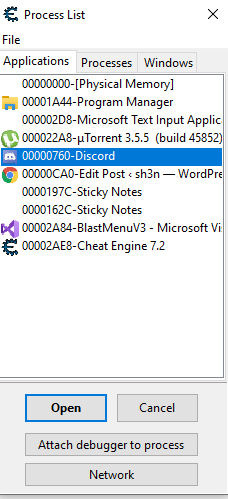
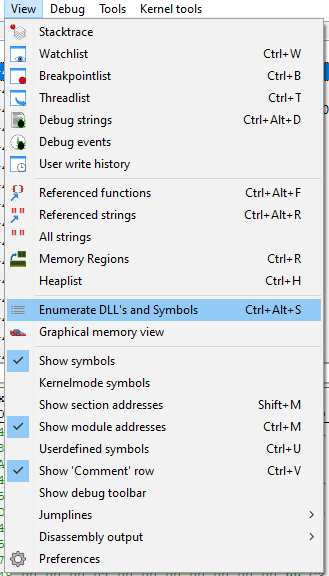
Okay, so first, I will be using Cheat Engine because it has a powerful tool that helps to enumerate dll’s. Second, I will be dissecting discord app as an example.

We’ll open up discord.
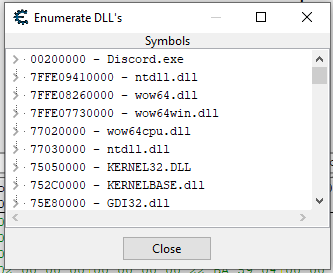
Enumerate the Dll’s
And look at that!

Look at that! Faker what was that?. We have seen two ntdll.dll, wow64.dll, wow64win.dll and wow64cpu.dll. Also, if you noticed, 3 dll’s are in 64bit address space. Remember that we cannot execute 64bit codes directly in 32bit application. So what’s happening?

Answer: WOW64

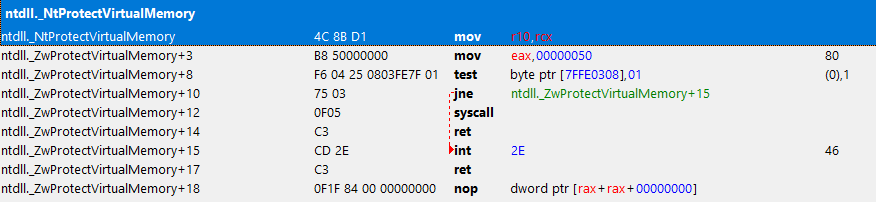
We’ll follow the traces from 32bit ntdll. Let’s trace the NtVirtualProtectMemory on it.

ZwProtectVirtualMemory in 32bit ntdll

It’s not a surprise that we might not found syscall here. But we’ll follow the call.

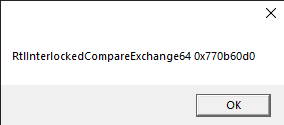
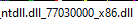
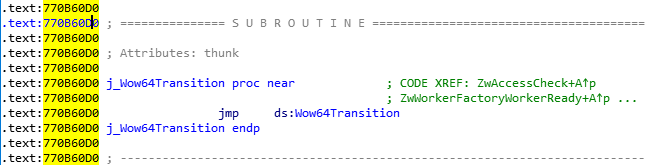
ntdll.RtlInterlockedCompareExchange64+170 in 32bit ntdll
wow64cpu.dll + 7000

Look at that! RAX?!! 64bit code! What is this?

In fact, on 64-bit Windows, the first piece of code to execute in *any* process, is always the 64-bit NTDLL, which takes care of initializing the process in user-mode (as a 64-bit process!). It’s only later that the Windows-on-Windows (WoW64) interface takes over, loads a 32-bit NTDLL, and execution begins in 32-bit mode through a far jump to a compatibility code segment. The 64-bit world is never entered again, except whenever the 32-bit code attempts to issue a system call. The 32-bit NTDLL that was loaded, instead of containing the expected SYSENTER instruction, actually contains a series of instructions to jump back into 64-bit mode, so that the system call can be issued with the SYSCALL instruction, and so that parameters can be sent using the x64 ABI, sign-extending as needed.

In Alex Lonescu’ blog, he said.

So, whenever you are trying to syscall a function on 32bit ntdll, it will then traverse from 32bit ntdll to 64bit ntdll via wow64 layer dll’s.

Finally! The syscall in 64bit ntdll!

To summarize,

32-bit ntdll.dll -> wow64cpu.dll’s Heaven’s Gate -> 64-bit ntdll.dll syscall-> kernel-land

The solution

We just need to copy the opcode from ZwProtectVirtualMemory in 32bit ntdll. As I said, it was already hooked so we cannot use it. Meanwhile, we can imitate the original opcodes of it before it was hooked.

template<typename T>
void makesyscall<T>::CreateShellSysCall(byte sysindex1, byte sysindex2, byte sysindex3, byte sysindex4, LPCSTR lpFuncName, DWORD offsetToFunc, byte retCode, byte ret1, byte ret2)
{
	if (!sysindex1 && !sysindex2 && !sysindex3 && !sysindex4)
		return;

#ifdef _WIN64
	byte ShellCode[]
	{
		0x4C, 0x8B, 0xD1,					//mov r10, rcx 
		0xB8, 0x00, 0x00, 0x00, 0x00,		        //mov eax, SysCallIndex
		0x0F, 0x05,					        //syscall
		0xC3								//ret				
	};

	m_pShellCode = (char*)VirtualAlloc(nullptr, sizeof(ShellCode), MEM_RESERVE | MEM_COMMIT, PAGE_EXECUTE_READWRITE);

	if (!m_pShellCode)
		return;

	memcpy(m_pShellCode, ShellCode, sizeof(ShellCode));

	*(byte*)(m_pShellCode + 4) = sysindex1;
	*(byte*)(m_pShellCode + 5) = sysindex2;
	*(byte*)(m_pShellCode + 6) = sysindex3;
	*(byte*)(m_pShellCode + 7) = sysindex4;

#elif _WIN32
	byte ShellCode[]
	{
		0xB8, 0x00, 0x00, 0x00, 0x00,		        //mov eax, SysCallIndex
		0xBA, 0x00, 0x00, 0x00, 0x00,		        //mov edx, [function]
		0xFF, 0xD2,						//call edx
		0xC2, 0x14, 0x00								//ret
	};

	m_pShellCode = (char*)VirtualAlloc(nullptr, sizeof(ShellCode), MEM_RESERVE | MEM_COMMIT, PAGE_EXECUTE_READWRITE);

	if (!m_pShellCode)
		return;

	memcpy(m_pShellCode, ShellCode, sizeof(ShellCode));

	*(uintptr_t*)(m_pShellCode + 6) = (uintptr_t)((DWORD)GetProcAddress(GetModuleHandleA("ntdll.dll"), lpFuncName) + offsetToFunc);

	*(byte*)(m_pShellCode + 1) = sysindex1;
	*(byte*)(m_pShellCode + 2) = sysindex2;
	*(byte*)(m_pShellCode + 3) = sysindex3;
	*(byte*)(m_pShellCode + 4) = sysindex4;

	*(byte*)(m_pShellCode + 12) = retCode;
	*(byte*)(m_pShellCode + 13) = ret1;
	*(byte*)(m_pShellCode + 14) = ret2;
#endif
}
makesyscall<NTSTATUS>(0x50, 0x00, 0x00, 0x00, "RtlInterlockedCompareExchange64", 0x170, 0xC2, 0x14, 0x00)(GetCurrentProcess(), &addr, &size, PAGE_EXECUTE_READ | PAGE_GUARD, &oldProtection)

POC

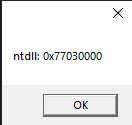
Okay, so here is it. We’ve injected the dll and got some print for debugging.

Printing base ntdll
Printing the location of Rtl…

We dumped the running executable to check the print results. And, hell yeah!

Result of dump
Check the location of Rtl…

We then therefore conclude that we have successfully bypassed basic usermode hook.

Extended usage

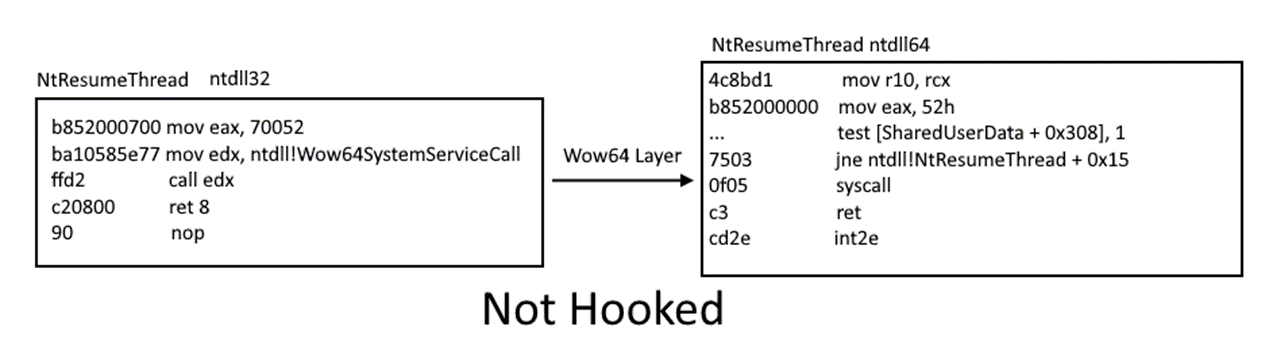
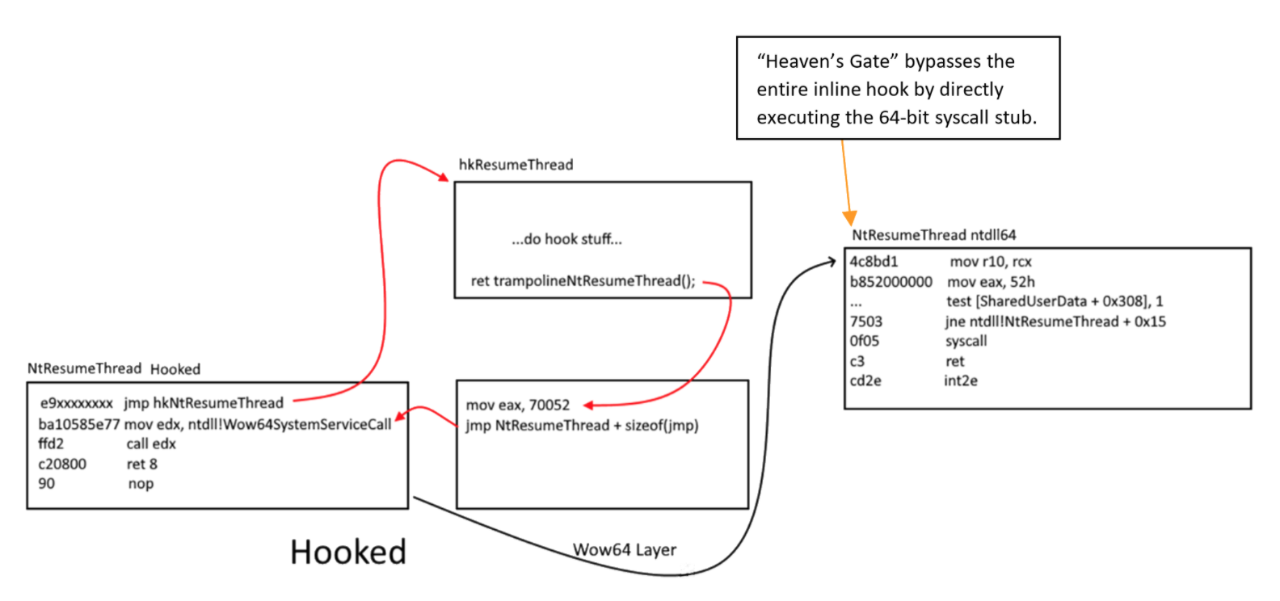
With all this knowledge, we can also implement heaven’s gate hook! All syscalls will then be caught, and have the option to do actions based on the syscalls as your will. But we will not cover this topics as it can be cited from another writeup: WOW64!Hooks: WOW64 Subsystem Internals and Hooking Techniques

Fig 14: https://www.fireeye.com/blog/threat-research/2020/11/wow64-subsystem-internals-and-hooking-techniques.html
NtResumeThread inline hook before transitioning through the WOW64 layer
Fig 15: https://www.fireeye.com/blog/threat-research/2020/11/wow64-subsystem-internals-and-hooking-techniques.html

Conclusion

We therefore conclude that wow64 application are able to execute 64bit syscalls via Heaven’s Gate.
A big thanks to admiralzero@UC for pointing me on the right direction. When I figured out that they hook usermode functions, I feel that was locked out and pushed to do kernel usage, but no, there was a way. And here it is, going through the heaven’s gate!